


Quick Answer: AO Smith water softener error codes are plain-English messages, not numbers. Home not found, Home offset and Home latched all start with the same fix: unplug the transformer, make sure the controller is pushed fully onto the valve's drive end cap, and plug it back in. Motor error means unplug and replug the motor, sensor and power cord in that order. Memory error means the controller needs replacing.
If you own one of the Lowe's-sold A.O. Smith units, the screen tells you what's wrong in words, which is more than most brands manage. The catch is that "Home latched" means little until you know what "home" is. This guide explains all five A.O. Smith water softener error codes, what each one says about the valve, and the order to try fixes in.
Everything below comes from A.O. Smith's own documentation: the owner's manual for the AO-WH-SOFT-350C, 400T and 450T and part #100238095, which covers the 450T, PRO-300 and PRO-500. The error list is the same in both. If your model isn't one of these, check its manual on the A.O. Smith support site before trusting this list. Third-party "Err 01" style code lists you'll find online don't match what these controllers actually display.
In this guide
- What "Home" means inside an A.O. Smith valve
- Home not found: reseat the controller first
- Home offset usually follows a power cut
- Home latched points to gears or debris
- Motor error: replug in the right order
- Memory error has no reset
- How to clear AO Smith water softener error codes and prove the fix
- Problems the A.O. Smith screen never reports
- Keep the next error from happening
- FAQ
- Most A.O. Smith errors are a seating problem, not a dead softener
What "Home" means inside an A.O. Smith valve
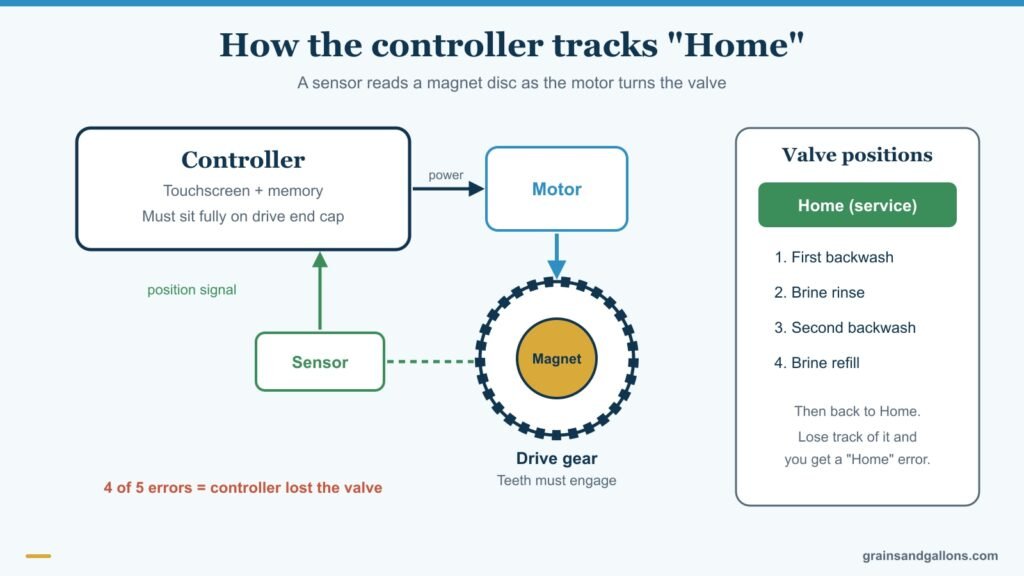
Inside the control valve, a disc rotates to send water through each stage of regeneration. A.O. Smith's manual lists four stages: a first backwash, the brine rinse, a second backwash, and the brine refill. "Home" is the disc's resting position, the one it sits in while you're using soft water.
The controller knows where the disc is by reading a magnet disc with a sensor as the motor turns the drive gear. Four of the five error messages are the controller saying "I've lost track of the valve" in different ways. That's why the same two checks, a power cycle and a firmly seated controller, fix most of them.
Home not found: reseat the controller first

What it means: the controller can't find the valve's home position.
Fix: unplug the transformer and plug it back in, so the controller searches again. Then check the most common cause: a controller that isn't fully seated on the drive end cap or cover plate. If someone pulled the controller off for service, or it got bumped while adding salt, push it firmly back on until it sits flush.
Home offset usually follows a power cut

What it means: the disc didn't start from the proper home spot.
Fix: cycle power. The manual says the controller will try to reset itself by finding Home and continuing the regeneration. Confirm it's seated on the drive end cap. Because the fix includes "continuing the regeneration," this message often appears after the power drops partway through a cycle.
Home latched points to gears or debris
What it means: the gear teeth aren't engaged, a gear is stripped, or something is jammed in the valve.
Fix: the manual says cycle power to reset. If the message comes back, the problem is mechanical. Look at the drive gear for missing or rounded teeth, and think about what changed recently: a service visit, or the water being shut off and turned back on, which can stir sediment loose. Debris can stop the disc. That repair usually means a valve kit or a service call through A.O. Smith.
Motor error: replug in the right order

What it means: the motor or its wiring isn't responding.
Fix: unplug and replug the wires in this order: motor, sensor, then power cord. Then cycle power. If everything was already plugged in firmly, the manual points to defective motor wiring or a bad motor plug, or a problem with the controller itself.
Look for a pinched wire behind the cover or a connector with green corrosion if the unit sits in a damp garage or basement.
Memory error has no reset
What it means: the controller's memory has failed.
Fix: replace the controller. Power cycling won't clear it, and nothing else on the softener is at fault. Call A.O. Smith with your model and serial number to order the right part.
How to clear AO Smith water softener error codes and prove the fix
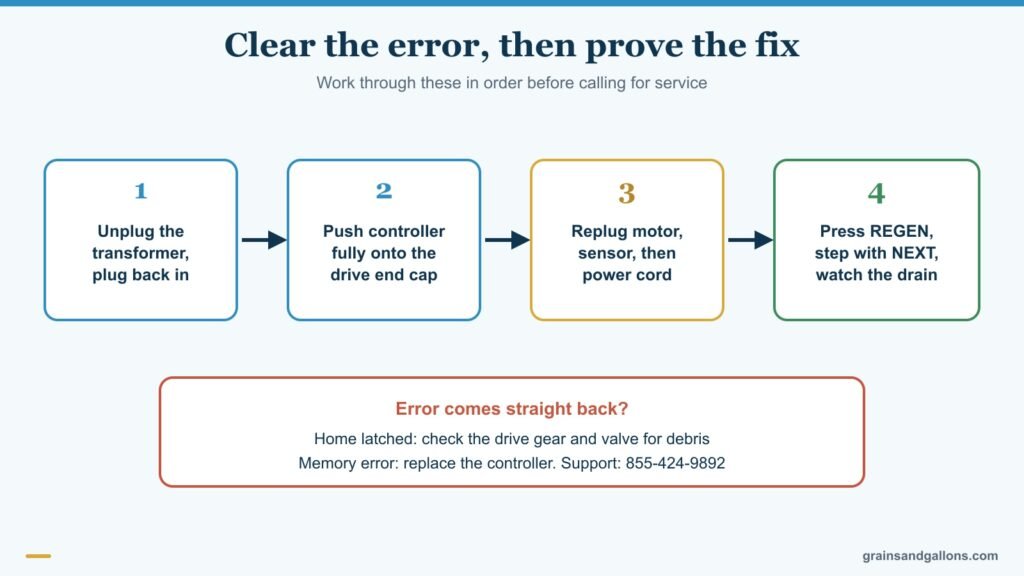
There's no separate "clear error" button; a power cycle is the reset. Once the message is gone, prove the valve actually moves:
- Press REGEN to force an immediate regeneration.
- A NEXT button appears. Use it to advance the valve through each position.
- Listen for the motor at each step and watch for water flowing to the drain during backwash.
- Let it finish the brine refill and return to Home on its own.
If settings got scrambled, the factory reset is on the Main Menu: press RESET, then Yes on the Restore Defaults screen. You'll have to re-enter the time and your water hardness afterward.
A.O. Smith's support line, printed throughout the manual, is 855-424-9892. Have the model and serial number from the sticker ready.
Problems the A.O. Smith screen never reports
Most softener faults never produce a message, because the controller only knows about its motor and valve position. It can't see salt, the injector or the drain. Here's the manual's troubleshooting chart condensed into the symptoms owners notice:
| What you notice | Likely cause from the manual | What to do |
|---|---|---|
| Hard water right after a regeneration | No salt, salt bridge, plugged injector, plugged brine line or flow control, restricted drain line | Add salt and break up any bridge. Clean the injector nozzle and throat. Check the drain line isn't kinked or frozen. |
| Hard water all the time | Bypass left in bypass, unit plumbed backwards, hardness rose, outage reset the clock | Set the bypass to Service. Retest hardness and re-enter it. Reset the time and regenerate. |
| No flow shown while water runs | Bypass in bypass, plumbed backwards, sensor not reading the turbine magnet, jammed turbine | Set to Service. Test the sensor with a magnet. Remove the bypass valve and clear debris from the turbine. |
| Flow shown with every tap off | A leak somewhere in the house | Find it. A running toilet is the usual suspect. |
| Blank display | Transformer unplugged, switched outlet, bad transformer (under 10 VAC at the control) | Plug in, use an unswitched outlet, test voltage, then replace the part at fault. |
| Stuck in regeneration | Controller not seated, defective magnet disc, debris in the valve | Push the controller fully on. Then it's a parts or service job. |
| Too much water in the brine cabinet | Restricted drain line, plugged brine line or injector | Clear the drain line, clean the brine parts and injector. |
| Salty water | Plugged injector, pressure under 30 psi, restricted lines, brine valve dripping back | Clean or replace the injector. Confirm at least 30 psi. |
The injector shows up in almost every row. It's a small part with a tiny opening that clogs with sediment and salt grit; our injector cleaning guide shows how to get it out. For a hardened crust in the salt tank, see how to break a salt bridge. If the cabinet is filling with water, brine tank full of water walks through the causes in order. For a screen that's gone completely dark, our general guide to a water softener error code or blank display covers power checks across brands.
Keep the next error from happening

A few habits from the manual prevent most of the problems above:
- Keep salt above the water line. A.O. Smith says to keep the salt level above the water level and to fill the cabinet about three-quarters full. Expect roughly 2 to 12 inches of water in the cabinet.
- Use clean salt. The manual allows clean white pellet, cube-style or solar salt, but not pellets mixed with solar salt. High-purity pellets leave less grit to clog the injector; see our water softener salt picks.
- Plug into an unswitched outlet so a wall switch can't cut power mid-regeneration and trigger Home offset.
- Watch for iron. Penn State Extension notes that oxidized red iron will clog softener resin; if you see orange staining, deal with the iron before it fouls the valve and resin.
If repairs keep stacking up, our A.O. Smith water softener review covers how the line holds up over time.
FAQ
How do I reset an A.O. Smith water softener?
Unplug the transformer, wait a few seconds and plug it back in. That clears the error and makes the controller look for Home again. To restore factory settings, go to the Main Menu, press RESET and choose Yes, then re-enter the time and hardness.
Why does my A.O. Smith softener say Home not found?
The controller can't locate the valve disc's resting position. The usual cause is a controller that isn't pushed fully onto the drive end cap. Reseat it and cycle power.
What does Home latched mean on an A.O. Smith softener?
The drive gear teeth aren't engaged, a gear is stripped, or debris is jamming the valve. Cycle power once; if the message returns, inspect the gear or call A.O. Smith for a valve repair.
Can I fix an A.O. Smith Memory error myself?
Only by replacing the controller. There's no reset for a memory failure. Order the replacement using the model and serial number on the unit's sticker.
Why is my A.O. Smith softener giving hard water with no error code?
The controller can't see salt, the injector or the bypass. Check for a salt bridge, make sure the bypass is in Service, clean the injector and confirm the hardness setting and clock are correct.
Most A.O. Smith errors are a seating problem, not a dead softener
Four of the five AO Smith water softener error codes are the controller losing track of the valve, and a power cycle plus a firmly seated controller clears most of them. Replug the wires in order for a Motor error, replace the controller for a Memory error, and if Home latched keeps coming back, it's time for a valve repair rather than another reset.