


Quick Answer: Clack WS1 error codes all describe how the drive motor moved. 101 means the control sensed no motor movement. 102 means the motor stalled too soon, usually from debris or a binding piston. 103 means it ran too long without finding the next position. 104 means it couldn't find home, usually because the drive bracket isn't snapped in. 106 and 107 involve an auxiliary valve. Fix the cause, then resynchronize: hold NEXT and REGEN together for 3 seconds.
Clack WS1 error codes don't come as beeps or blink patterns. The display alternates the word "ERROR" with a number, and Clack's OEM manual says the number means the valve couldn't function properly. Each number tells you how the drive misbehaved: it never moved, stopped too soon, or ran too long. Once you know which, the list of causes is short.
Source: Clack Corporation, WS1 & WS1.25 Drawings and Service Manual, form V3115-99 (revision dated 1/21/2026), troubleshooting section. Causes and fixes below come from that manual. Depending on firmware, a code may read as E1, Err-101 or Err-1001. Clack lists all of these as the same error.
In this guide
- Clack WS1 error codes and Clack's official fixes
- Why a WS1 only ever complains about timing
- Too short, too long, or nothing at all
- Clack error 101: seat the motor and the board
- Errors 102 and 103: pull the piston and spacer stack
- Error 104 is almost always the drive bracket
- Error 106 often comes from programming, not hardware
- Resynchronize the WS1 after the repair
- FAQ
- Fix the cause first, then resync the valve
Clack WS1 error codes and Clack's official fixes

| Code (and variants) | What the control saw | Likely cause per Clack | Clack's fix |
|---|---|---|---|
| 101 (E1, Err-1001) | No motor movement sensed | Motor not fully engaged with the pinion; motor wires broken or disconnected; PC board not snapped into the drive bracket; missing reduction gears | Disconnect power, seat the motor, check wires and the two-pin connector; snap the board in fully; replace missing gears. Then resync |
| 102 (E2, Err-1002) | Motor ran too short and stalled before the next cycle position | Foreign material in the valve; mechanical binding; main drive gear too tight; wrong voltage to the board | Pull and inspect the piston and seal/stack; check gears, bracket and drive gear; loosen the main drive gear; verify supply voltage. Then resync |
| 103 (E3, Err-1003) | Motor ran too long without finding the next position | Motor failed mid-regeneration; buildup on piston and stack causing drag; drive bracket not snapped in far enough | Check motor connections; replace piston and stack; snap the bracket in properly. Then resync |
| 104 (Err-1004) | Motor ran too long trying to reach home | Drive bracket not snapped in, so gears don't mesh | Snap the drive bracket in properly. Then resync |
| 106 (Err-1006, Err-116) | Auxiliary valve motor (MAV/SEPS/NHBP/AUX MAV) ran too long looking for park | Programmed for an alternating or bypass valve that isn't attached; MAV motor wire unplugged; MAV motor not engaged; buildup on its piston and stack | Resync and reprogram to the correct setting; plug the motor into the two-pin DRIVE connection; seat the motor without forcing it; replace piston and stack. Then resync |
| 107 (Err-1007, Err-117) | Auxiliary valve motor ran too short (stalled) | Debris in the MAV/NHBP valve; binding, including the drive pinion jammed into the motor body | Inspect the auxiliary valve's piston and seals; check gears and pinion. Then resync |
Why a WS1 only ever complains about timing

The codes make more sense once you know how the valve finds its positions. According to Clack's service manual, the WS1 has no cams or position switches. A reversible DC motor turns three drive gears, and those gears carry a reflective coating. A light shines on the center gear, a light-sensing diode picks up each returned pulse, and the PC board counts pulses. Each cycle position (backwash, brine, rinse, refill, service) is a set number of pulses from home.
Home, the service position, works differently. The board drives the piston until it hits a mechanical stop and notices the jump in motor current. The pulse counter resets to zero there.
So the board can only notice three kinds of trouble: no pulses at all, pulses that stop before the target count, or a motor that keeps running without reaching the target. That is exactly how the error codes split. It also explains a warning in the manual: don't lubricate the gears, and keep dirt and oil off the reflective coating, because both can interfere with pulse counting. For the bigger picture of what the piston does at each step, see how a softener control valve works.
Too short, too long, or nothing at all
The table is long, but there are three failure types:
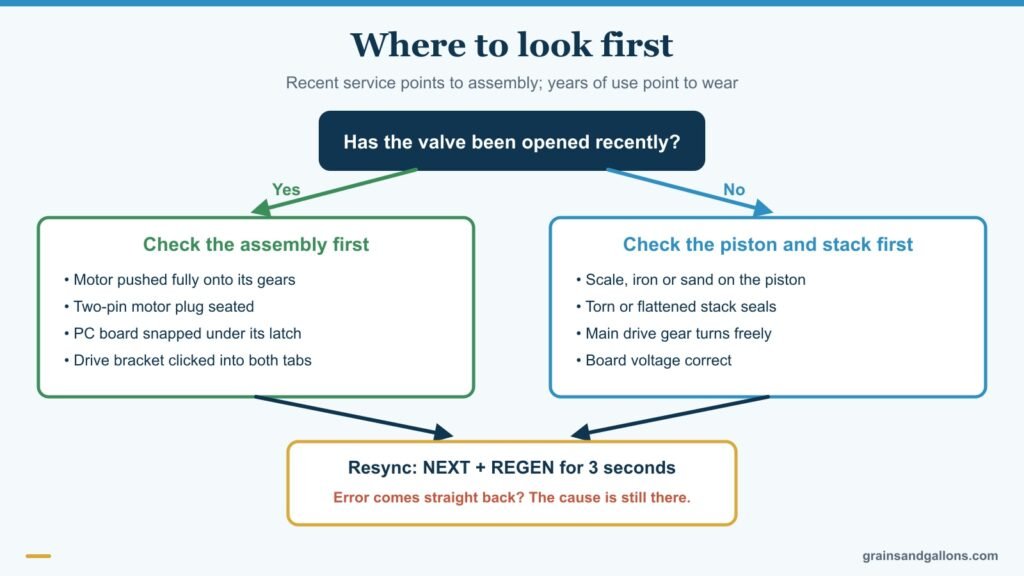
"Nothing moved" (101). The board sent power and saw no pulses. It's often an assembly problem: a motor not pushed home, a loose two-pin plug, or a board not clipped into the bracket. If someone had the drive apart just before the error appeared, start there.
"Stopped too soon" (102, 107). The motor hit resistance and stalled. Clack's top suspects are debris in the valve and binding. On a softener fed by a well, think iron, sand or a cracked resin bead caught in the seals. A main drive gear screwed down too tight can also do it.
"Ran too long" (103, 104, 106). The motor kept going without the control seeing the position it wanted. That's drag from a worn piston and stack, a motor that gave up partway, or gears that don't mesh because the drive bracket isn't seated.
The rule of thumb: if the valve was opened recently, check assembly first. If nobody has touched it in years, check the piston and stack first.
Clack error 101: seat the motor and the board

Unplug the black power wire from the PC board before touching anything else. Clack's manual lays out the WS1 jacks: the four-pin jack takes power, the two-pin jack on the left takes the motor, and the three-pin jack on the right takes the water meter's gray wire.
Then work through Clack's 101 list:
- Motor. It's held by a spring clip and a small plastic bulge. Move the clip loop right, rotate the motor gently until its gear meshes, release the clip and keep rotating until the wires sit horizontal and the housing engages the bulge. Pull the motor by its connectors, never by its wires, or they can break off.
- Plug. Check that the two-pin motor plug is fully seated and the wires aren't cut or pinched.
- Board. The PC board should be snapped under the middle latch at the top of the drive bracket, with its lower holes on the bracket's two pins.
- Gears. Pop the drive gear cover (the large clip faces down) and make sure all three gears are on their pegs.
If the motor still won't turn after all of that, our motor not turning guide covers power checks and motor replacement.
Errors 102 and 103: pull the piston and spacer stack

Both codes put the piston and seal/stack at the top of Clack's list. The job, in the order the service manual describes it:
- Put the softener in bypass and relieve pressure by opening a softened tap.
- Unplug the power jack from the PC board.
- Remove the valve cover, unplug the power and meter wires, then lift the two tabs on the drive back plate and ease the drive bracket forward and off.
- Unscrew the drive cap assembly counterclockwise. Clack's plastic wrench works, or a flat screwdriver used as a lever in the slots. Pull it straight out with the piston attached.
- Fully extend the piston rod and unsnap the main piston by pressing on the side with the number. A softener also has a small regenerant piston behind it that unsnaps sideways.
- Look for scoring, scale, iron staining or debris on the piston, and torn or flattened seals in the stack. Clack says pistons can be chemically cleaned in dilute sodium bisulfite or vinegar, or replaced.
- Reassemble, hand-tighten the drive cap, then snug it until the stack's black O-ring is no longer visible through the drain port. Confirm the main drive gear still turns freely, because a cap that's too tight is itself a cause of 102.
Use only silicone-based lubricant on Clack O-rings. The manual warns that hydrocarbons such as petroleum jelly or WD-40 damage O-rings and plastic, and adds that lubricant on the black O-rings is optional. Our stuck piston guide has more on replacing a worn stack, and the control valve servicing guide covers seals and injectors.
Error 104 is almost always the drive bracket

Clack lists a single cause for 104: the drive bracket isn't snapped in properly, so the gears don't engage the drive cap. It's a common code right after piston work.
To seat it, rest the notches at the bottom of the bracket on the drive back plate, then push the top toward the two latches. You may need to lift it slightly so the threaded piston rod passes through its hole. Clack's tip is to keep light pressure on the top while pushing the upper right corner slightly to the left, which helps the gears mesh. It's seated when it snaps under the latches. If you feel resistance before it latches, the manual names four culprits: notches not engaged, piston rod not in its hole, wires jammed behind the bracket, or the gear not meeting the drive cap.
Error 106 often comes from programming, not hardware
The first cause Clack lists for 106 is a valve programmed for an alternating (ALT A or B), no-hard-bypass (nHbP), separate source (SEPS) or AUX MAV setup when that valve isn't installed. That usually happens after a board swap or after someone experiments in the OEM settings. Resync, then set the valve back to the right configuration. Our Clack WS1 programming guide shows where those settings live.
If the system really has a motorized alternating valve, check that its motor is plugged into the two-pin connection labeled DRIVE and seated without force. Error 107 is the same auxiliary valve stalling instead, so look for debris or a jammed pinion.
Resynchronize the WS1 after the repair

Clack's term for clearing the error and re-homing the valve is resynchronize. The service manual gives two methods:
- Buttons: press and hold NEXT and REGEN together for 3 seconds. On valves with a three-button TC board, hold SET and DOWN instead.
- Power: disconnect the power jack from the PC board for 5 seconds, then reconnect.
The display should flash all its wording, then the software version, then return the valve to service. If the error comes straight back, the cause is still there. Clack lists the resync as the step after you correct the cause. It is not a fix on its own.
Check the error log. The WS1 keeps a record. Clack's OEM manual describes an error log under valve history (step 7VH) that shows the last 10 errors the control generated. That's useful when a code appears once and clears, and you want to know whether it's recurring or which code came first.
Prove the fix. Once the display is clean, start a full manual regeneration and watch each cycle advance. Our Clack WS1 manual regeneration guide covers the button steps and what you should see at the drain and brine tank. A valve that steps through every cycle and returns to service without a code is fixed.
If you need part numbers or exploded drawings, Clack posts current manuals on its technical documents page.
FAQ
Does unplugging a Clack WS1 clear the error?
Disconnecting power from the PC board for 5 seconds is one of Clack's two official resync methods, so it will clear the display. But if the cause is still there, the same error returns the next time the motor runs. Fix the cause first, then resync.
What does Err 1001 mean on a Clack valve?
Err-1001, Err-101 and E1 are the same code on different firmware versions. The control couldn't sense the motor moving. Check that the motor is fully engaged, the two-pin motor plug is connected, the PC board is snapped into the bracket and no reduction gears are missing.
Why did my Clack show error 104 right after I replaced the piston?
The drive bracket probably isn't fully snapped onto the back plate, so the gears don't mesh with the drive cap. Remove it and reseat it until it clicks under both latches, making sure the piston rod passes through its hole and no wires are pinched.
Can I lubricate the gears on a Clack WS1?
No. Clack's manual says not to lubricate the motor or the gears and to keep dirt and oils off the reflective coating, which the board reads to count pulses. Only the O-rings may get a silicone-based lubricant.
Is error 102 the same as a stuck piston?
Often. Error 102 means the motor stalled before reaching the next position, and Clack's first two causes are debris in the valve and mechanical binding. Both usually trace to the piston and spacer stack. A main drive gear tightened too far or wrong board voltage can cause it too.
Fix the cause first, then resync the valve
Clack WS1 error codes are a timing report from the drive: no movement (101), a stall (102, 107) or a motor that ran too long (103, 104, 106). Match the code to its group, check assembly if the valve was recently opened or the piston and stack if it wasn't, and only then hold NEXT and REGEN to resynchronize. A full test regeneration confirms the repair.
Clack parts are easy to find, and the motor, gears, piston and stack are all replaceable without tools beyond a screwdriver. So a Clack WS1 error code rarely means the head is finished. A cracked valve body or a drive that keeps failing after new parts is different. Then a new head may cost less than chasing repairs. See our picks for the best replacement control valves, or our best Clack valve water softeners if the whole system is due.
More Clack and valve guides: How to program a Clack WS1 · Manual regeneration on a Clack WS1 · Stuck piston in the control valve · Best Clack valve water softeners