


Quick Answer: For a Clack WS1 manual regeneration, press and release REGEN once and REGEN TODAY flashes. The softener then regenerates at its programmed time tonight, and a second tap cancels it. To regenerate immediately, press and hold REGEN for 3 seconds until the motor starts. An immediate regen can't be cancelled, so make sure there's salt in the tank and nobody needs soft water for the next hour or so.
Clack WS1 manual regeneration all happens on one button, and REGEN does different things depending on how long you press it and whether you've already pressed it. That's why people end up with a softener that regenerates in the middle of dinner, or one that doesn't regenerate when they expected it to.
Below: what each press does, when to use it, what you should see during each cycle, and the setting that makes the button behave differently.
The steps come from Clack's current WS1 & WS1.25 Operation and Instruction Manual (form V3115) and the homeowner reference guide Clack prints for its CI controls. Some sellers ship WS1 valves with customized controls. If your screen doesn't match what's described here, ask the seller for the programming sheet for your unit.
In this guide
- Clack WS1 manual regeneration: pick the right press
- Before you hold the button: salt and timing
- Why the tap does nothing on some valves
- What each cycle looks like on a WS1 softener
- Run a brine-draw test with an immediate regen
- Confirm the regeneration in diagnostics
- If the power goes out mid-regeneration
- FAQ
- Tap for tonight, hold only when you need it now
Clack WS1 manual regeneration: pick the right press
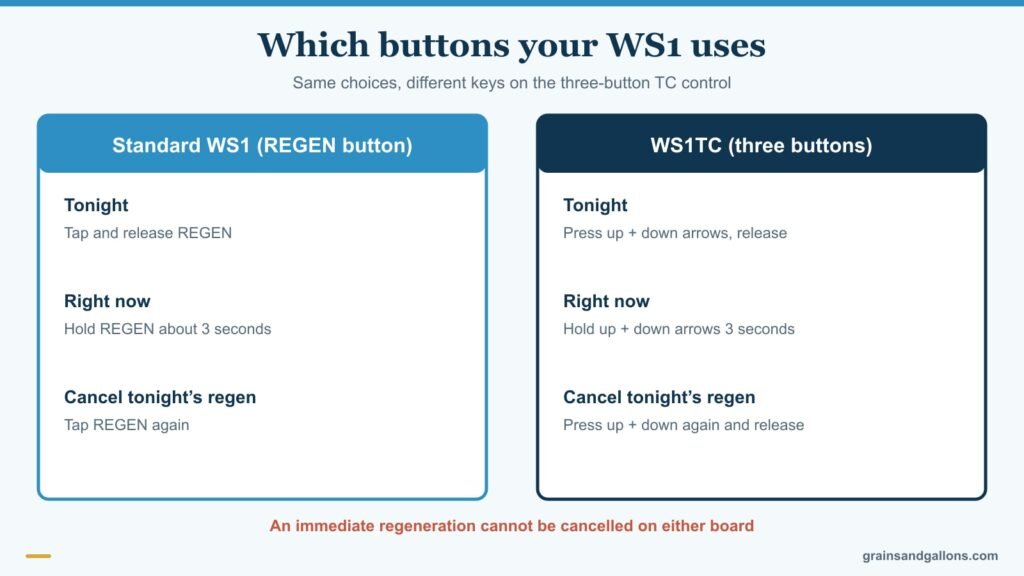
"I want it to regenerate tonight." Press and release REGEN. REGEN TODAY flashes, and the valve regenerates at the preset time, which Clack's reference guide says is typically 2:00 a.m. This is the right choice almost every time. You get the regeneration, and the house isn't on hard water while you're using it.
"I pressed it by accident." Press REGEN again. The flashing stops and the request is cancelled. This only works for the tap, not the hold.
"I need soft water today." Hold REGEN for about 3 seconds, until the valve motor starts. The manual says the system begins regenerating immediately and the request cannot be cancelled. Use it after refilling an empty salt tank, after a resin cleaner, or when you're testing the valve.
"The resin is badly exhausted and I want two in a row." Press REGEN once (REGEN TODAY flashes), then press and hold it for 3 seconds. Clack calls this a double regeneration: the valve runs one regeneration now and another at the preset time, then returns to its normal schedule. It's useful after the softener ran out of salt for days.
"My control only has three buttons." WS1 valves with a TC board have no REGEN button. Clack's WS1TC manual says to press the up and down arrows together and release to schedule a regeneration for tonight, or press and hold both for 3 seconds to start one immediately.
Before you hold the button: salt and timing

Two checks save you from a wasted regeneration.
Salt. Clack's manual is specific: if the brine tank has no salt, fill it and wait at least 2 hours before regenerating. Fresh salt needs that time to dissolve into brine. An immediate regen on a tank of plain water rinses the resin without recharging it.
Water use. During a regeneration, the manual says untreated water goes to the house if anyone opens a tap. The WS1 doesn't shut the water off. It just stops softening until the cycle ends. Showers and laundry during an immediate regen get hard water, and hot water drawn then refills the heater with hard water too. Pick a quiet hour.
If the salt tank had a crust or bridge across it, break that up first. Otherwise the tank looks full while the water underneath has no salt to dissolve.
Why the tap does nothing on some valves

If you tap REGEN and REGEN TODAY never appears, check the Regeneration Time Option in programming. Clack's manual lists three choices:
- NORMAL: regenerates at the preset time.
- on 0: regenerates as soon as the volume capacity reaches zero, with no set time.
- NORMAL + on 0: regenerates at the preset time, unless capacity hits zero first.
With on 0 there's no delayed regeneration time, so REGEN TODAY won't activate when you tap the button. The hold still works. Double regeneration also needs NORMAL or NORMAL + on 0. If you'd rather have scheduled night regenerations, change that setting. Our Clack WS1 programming guide shows where it lives.
What each cycle looks like on a WS1 softener

Once a regeneration starts, the display shows the current step and the time left in it. The valve runs through the steps by itself and returns to service when it's done. On a standard downflow softener, Clack's manual gives this order, with two backwashes:
| Step | What's happening | What to check |
|---|---|---|
| Backwash | Water flows up through the resin and out the drain | Steady flow at the drain line |
| Regenerate | Brine is drawn from the salt tank and pushed slowly through the resin | Water level in the brine tank drops |
| Backwash | A second upflow flush | Drain flow resumes |
| Rinse | Leftover brine flushes to drain, packing the bed | Drain flow continues, then clears |
| Fill | Fresh water refills the brine tank for next time | Brine tank level rises |
| Service | Back to normal softening | Display returns to normal |
How long it takes. Clack's cycle-time table for a downflow softener with normal backwash shows 57, 80 or 99 minutes in total, depending on the salt dose. Fill time is added on top and depends on how much salt is needed. Clack's manual says the system provides treated water during the fill step.
Your order may differ. Upflow softeners backwash only once, after brining. Some installers choose pre-fill, which starts the fill step 2 hours before the regeneration time so the brine is ready when backwash begins. The display always tells you which step you're in, so trust it over this table.
Stepping through the cycles for testing. Clack's manual notes that the valve can be stepped through the regeneration cycles by pressing REGEN during a regeneration. That's how a technician checks each position quickly.
Stepping is a diagnostic tool, not a shortcut. If you skip Fill, the brine tank won't refill and the next regeneration won't have brine to work with. You'd get hard water a few days later without any warning. If you step through to test, finish with a complete regeneration afterward.
Run a brine-draw test with an immediate regen
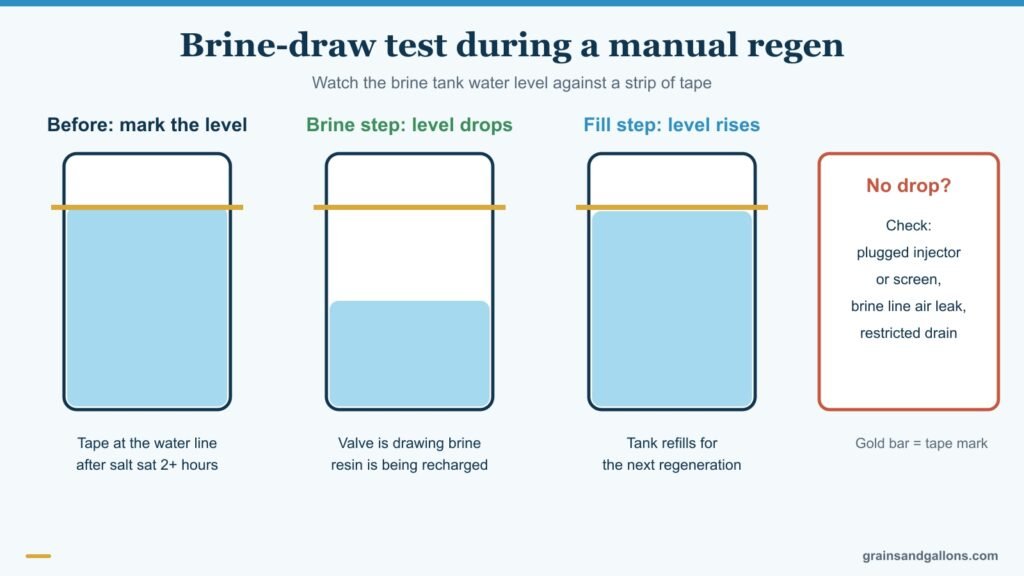
The most useful thing you can do with an immediate regeneration is confirm that the softener actually pulls brine.
- Make sure there's salt in the tank and that it has had at least 2 hours to make brine.
- Put a strip of tape at the water level in the brine tank.
- Hold REGEN for 3 seconds.
- When the display reaches the regenerate (brine) step, watch the tape. The level should drop noticeably during the step.
- Near the end of the cycle, the fill step should bring the level back up.
If the level doesn't move during brining, the softener isn't recharging the resin. Common culprits are a plugged injector or screen, an air leak in the brine line, or a restricted drain line. If you're getting hard water right after regeneration, this test tells you whether brine draw is the reason. For the full set of checks, see how to check if a water softener is working.
Confirm the regeneration in diagnostics
You don't have to watch the whole cycle to prove it happened. The WS1's Diagnostics menu (press the up and down arrows together for 3 seconds) opens on days since last regeneration. After a successful manual regen it should read zero. Further in, the same menu shows the total number of regenerations since the last reset. If the menu doesn't open within 5 seconds, the installer has locked it, and the manual gives the unlock sequence.
If the power goes out mid-regeneration

Clack's service manual says that when power returns, the control finishes the remaining regeneration time. Water running to the drain after an outage is usually just that: the valve completing its interrupted cycle.
Settings survive the outage. The OEM manual says the control keeps time for up to 8 hours on its battery. After a longer outage, the time of day flashes and is the only thing you need to reset. Everything else is stored in permanent memory. If the clock flashes after an outage shorter than 8 hours, reset it and replace the non-rechargeable battery.
If an error appears instead, such as E1, E2, E3 or a three- or four-digit "Err" code, the motor couldn't find a position. Our Clack WS1 error code guide covers each one and how to resync.
FAQ
How long does a Clack WS1 regeneration take?
On a downflow softener with normal backwash, Clack's cycle table shows 57 to 99 minutes depending on the salt dose, plus a fill step whose length depends on how much salt is being dissolved. Higher salt settings mean longer brine and rinse times.
Can I use water while my Clack softener regenerates?
Yes, water still flows, but Clack's manual says untreated water is used if there's demand during regeneration. You'll get hard water at the tap until the cycle ends, which is why the valve normally regenerates in the middle of the night.
How do I cancel a Clack WS1 regeneration?
If you tapped REGEN and REGEN TODAY is flashing, tap REGEN again to cancel. If you held the button and an immediate regeneration started, Clack says it can't be cancelled. Let it finish.
Why won't REGEN TODAY show on my Clack WS1?
Your Regeneration Time Option is probably set to "on 0," which regenerates whenever capacity reaches zero and has no scheduled time. Change it to NORMAL or NORMAL + on 0 in programming if you want the tap to schedule a night regeneration.
Should I add salt right before a manual regeneration?
Add it, then wait. Clack says that if the brine tank had no salt, you should fill it and wait at least 2 hours before regenerating so the salt can dissolve into brine.
Tap for tonight, hold only when you need it now
For almost every Clack WS1 manual regeneration, a single tap of REGEN is the right move: it schedules the regen for the night and can be undone. Hold the button for 3 seconds only when you need soft water today or you're testing the valve, and make sure the salt tank has had two hours to make brine. Use the tap-then-hold double regeneration after the softener has run dry, and watch the brine level during the brine step to confirm the valve is doing its job.
Plenty of people land here because they're replacing an old mechanical valve with a WS1, or comparing systems built on one. Clack valves are popular because they're serviceable and their programming is flexible. Our picks for the best Clack water softeners cover complete systems. If you only need a new head for an existing tank, our replacement control valve guide covers WS1 options. For other brands, our general manual regeneration guide covers the common button layouts.
More Clack guides: How to program a Clack WS1 · Clack WS1 error codes · Hard water after regeneration