


Quick Answer: Most Morton water softener error codes mean the control lost track of the valve. Err 01 to 04 point to the wiring harness, the position switch, a stiff valve or the motor, and Err 05 adds the control board. To clear one, unplug the power supply, fix the cause, plug it back in and wait 8 minutes (at least 12 on the MSD45E). Err 07, 08 and 09 only appear on the Wi-Fi M45C and mean its optional shutoff valve needs checking.
Morton water softener error codes are fewer and simpler than most brands', but the details change from model to model. An older M30 and a Wi-Fi M45C have different manuals, different code lists and even different button names. Start by lifting the salt lid and reading the model number on the rating decal. Morton's newer manuals say it sits on the rim below the salt lid hinges.
Be careful with code lists from generic repair sites. Many of them say things like "E1 is a sensor fault" or "E3 means low salt". None of that matches what Morton itself publishes. On these controls a low salt level won't trigger an error code at all.
In this guide
- Which Morton manual matches your model?
- What Morton water softener error codes 01 to 05 point to
- Err 07, 08 and 09 on the Morton M45C
- Clear the error the way Morton's manuals say
- Watch the cam with Manual Advance Diagnostics
- Prove the fix with a full regeneration check
- FAQ
- A code that returns after the reset points to a part
Which Morton manual matches your model?

These are the four manuals that cover most Morton softeners in US homes:
| M20, M27, M30, M34 | MC30 (2020 manual) | M45C Wi-Fi | MSD45E | |
|---|---|---|---|---|
| Codes listed | Not numbered: "an error code appears" | Not numbered | Err 01 to 05, plus 07 to 09 | Err 01, 03, 04, 05 |
| Buttons during an error | SELECT only | SELECT only | SELECT stays active | See manual |
| Wait after plugging back in | 8 minutes | 8 minutes | 8 minutes | At least 12 minutes |
| Enter diagnostics | Hold SELECT 3 seconds | Hold SELECT 3 seconds | Hold SELECT 3 seconds | Hold DATA |
The M20 to M34 and MC30 details come from Morton's installation and operation manual for those models (Rev. A, 2020), and the M45C details from the M45C Wi-Fi manual (document 7381229). The MSD45E figures come from Morton's System Saver manual for that model, document 7334159 (Rev. L). If your decal shows a model that isn't here, get its own manual before relying on any chart, including this one.
What Morton water softener error codes 01 to 05 point to

Morton's support pages group the numbered codes like this:
- Err 01, Err 03, Err 04: a fault in the wiring harness or the position switch, a fault in the valve, or a motor that isn't working.
- Err 05: a possible control board malfunction.
- Err 02: listed in the M45C manual as one of the five non-shutoff codes, with the same clearing steps.
Morton's own troubleshooting guide uses the labels E1 to E4 and lists four suspects for all of them:
- Wiring harness or the connection to the position switch: replace the harness or the connection.
- Faulty position switch: replace the switch.
- Jammed valve causing high motor torque: replace the rotor seal.
- Motor not running: replace the motor.
Morton doesn't assign one part to one code, so we won't pretend it does. Treat the list as a set of suspects that you work through from cheapest to dearest. For Err 05, rule out water damage and loose plugs before you buy a board. Moisture on the board, rust on its contacts or water dripping near the top of the unit are all worth fixing first.
Err 07, 08 and 09 on the Morton M45C
These three codes only exist on the M45C Wi-Fi softener, and only when its optional water shutoff valve is installed. The M45C manual says they "indicate a problem with the optional water shutoff valve," not with the softener itself.
The fix is short:
- Make sure the shutoff valve's cable is still plugged into the softener's control board.
- Hold RECHARGE for 3 seconds to clear the code.
- If the code comes back after a minute or two, the manual says the shutoff valve probably needs replacing.
Unplugging the power isn't the clearing method for these three codes, so don't wait out an 8-minute reset expecting Err 08 to vanish.
Clear the error the way Morton's manuals say

Every Morton manual uses the same four steps for the main codes:
- Unplug the power supply (the transformer) from the outlet.
- Correct the problem.
- Plug it back in.
- Wait 8 minutes on the M20 to M34, MC30 and M45C, or at least 12 minutes on the MSD45E.
The manuals warn that the code will return if its cause wasn't corrected. Unplugging only resets the control; it doesn't repair anything. With the unit unplugged and the top cover off, these are the things you can check and fix yourself:
- A connector that's worked loose from the board, the motor or the position switch
- A pinched, chewed or corroded wire in the harness
- A dead outlet, tripped GFCI or failing transformer
- Water or rust on the control board
A blank display is a separate problem from an error code. Morton's guide blames an unplugged or failed transformer, a blown fuse or tripped breaker, or a bad board. Our guide to a water softener error code or blank display covers how to tell them apart. If the motor hums but nothing moves, or makes no sound at all, see our motor not turning guide.
Watch the cam with Manual Advance Diagnostics

When an error is showing, only SELECT works, and that's on purpose. It lets you run Morton's Manual Advance Diagnostics and see which part of the loop is failing. Remove the top cover first so you can watch the cam and switch.
- Enter diagnostics. Press and hold SELECT for 3 seconds until "000" appears, then release.
- Meter check. With no soft water running, "000" holds steady. Open a nearby soft-water faucet and the digits count continually, repeating from 000 to 199 for each gallon on the M20 to M34 (000 to 140 on the M45C). No count means a meter or meter-wiring problem, which is separate from the error.
- Switch check. A letter "P" on the display means the position switch is closed; a dash means it's open.
- Step the valve. Press RECHARGE to move the valve into each cycle and confirm the switch responds as the cam turns.
- Read the counters. UP shows the days the control has had power; DOWN shows how many regenerations it has started.
Read the result like this. If the motor runs but the switch display never changes, look at the switch and its wiring. If the motor strains or stalls, the valve is too stiff; Morton's fix for that is a new rotor seal. If nothing moves and nothing hums, the motor or its power is the suspect.
The manual adds one more check during this test: make sure water is actually touching the salt, not sitting under a crusted bridge. A salt bridge won't cause an error code. It will still leave you with hard water, though, so break it up now if you find one. Our guide to fixing a water softener salt bridge shows how to do it safely.
The same diagnostic menu also shows the model code (for example "o45" on the M45C). The manual warns that a wrong model code makes the softener run on incorrect configuration data. That's worth checking after a board swap.
Prove the fix with a full regeneration check
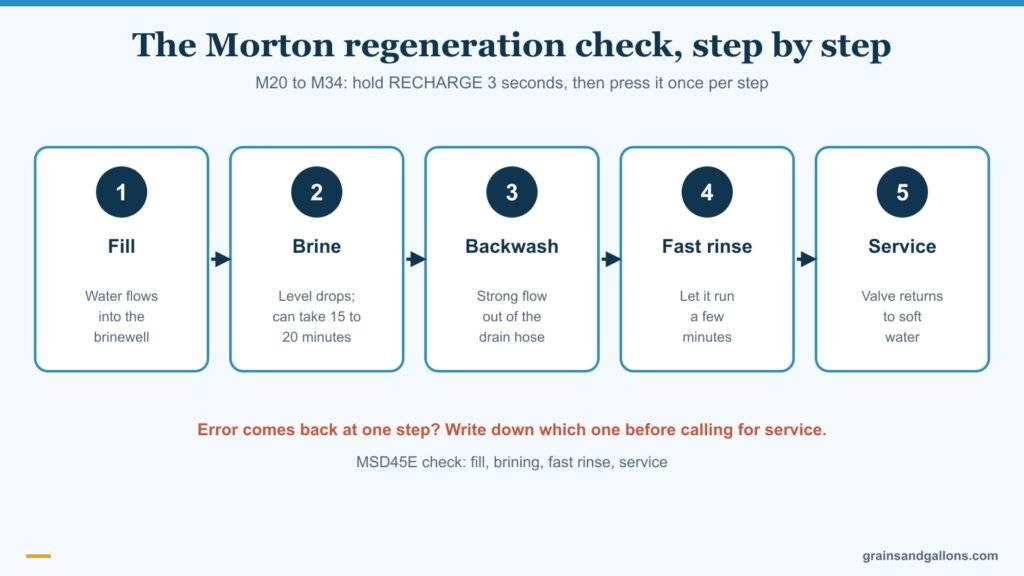
Once the error stays away, run the manual's regeneration check. On the M20 to M34, with a steady (not flashing) time on the display:
- Hold RECHARGE for 3 seconds. The valve moves to fill. Look into the brinewell with a flashlight for incoming water.
- Press RECHARGE for brine. The liquid level should drop noticeably; Morton says this can take 15 to 20 minutes. No drop usually means a dirty nozzle and venturi. Our injector cleaning guide covers that.
- Press RECHARGE for backwash. Expect a strong flow from the drain hose.
- Press RECHARGE for fast rinse and let it run a few minutes.
- Press RECHARGE to return to service.
On the MSD45E, the check runs through fill, brining, fast rinse and back to service using the same button. If the error comes back at one particular step, write down which one. A service tech can use that note to tell the motor from the switch. For an ordinary extra regeneration instead, a short tap of RECHARGE queues one for tonight, and holding it starts one right away. See how to manually regenerate a water softener.
Last resort, factory reset. The newer manuals describe it this way: hold SELECT until "CODE" and the flashing model code appear, press UP until "SoS" flashes, then press SELECT to restart the control. It wipes the time, hardness and other settings, so write them down first. A reset won't fix a broken switch or motor.
FAQ
How do I reset a Morton water softener error code?
Unplug the power supply, correct the cause, plug it back in and wait 8 minutes on most models or at least 12 minutes on the MSD45E. The code clears only if the problem is fixed. On the M45C, Err 07, 08 and 09 clear differently: hold RECHARGE for 3 seconds.
What does Err 01 mean on a Morton softener?
Morton links Err 01, 03 and 04 to the wiring harness, the position switch, the valve or the motor. In plain terms, the control told the valve to move and never got confirmation that it arrived. Check the connectors first, then use the diagnostics to watch the switch.
Does a Morton error code mean the softener is out of salt?
No. Morton's manuals don't use error codes for salt level. The M45C tracks salt through a separate salt-level setting instead. Low salt or a salt bridge gives you hard water without any code.
Why do my buttons stop working when an error shows?
That's normal on the M20 to M34 and MC30. While an error code is displayed, every button except SELECT is locked out, so a service person can still run the Manual Advance Diagnostics.
Is Err 05 always a bad control board?
Not always. Morton lists the board as the likely cause, but water on the board, a loose connector or a failing transformer can cause the same symptoms. Check those first, because a board is usually the most expensive part to replace.
A code that returns after the reset points to a part
The fix for most Morton water softener error codes follows the same pattern: check the model, unplug and fix, wait the full 8 or 12 minutes, then run the diagnostics if the code comes back. On the M45C, Err 07 to 09 are a shutoff-valve problem, not a softener problem.
A code that keeps returning means a part has failed, and the cheap parts fail most often. A wiring harness or position switch is a modest repair. Morton's support line is 1-888-649-2837; have the model and serial number from the decal ready. A motor plus a control board on an out-of-warranty unit adds up fast, so at that point compare the cost with a new softener. Our GE vs Morton water softener comparison and our list of the best metered on-demand water softeners are good places to start. Whatever you decide, unplug the unit before opening the cover, and call an electrician if the outlet shows moisture or heat damage.