


Quick Answer: Current GE water softener error codes come down to one message: Err, which GE defines as an electrical problem. It arrives with the blue light flashing four times a second and a beep every 30 seconds between 8 a.m. and 8 p.m. Unplug the transformer, reseat any loose wiring at the electronic board and position switch, plug back in and wait 8 minutes. If Err returns, run GE's diagnostic screen or call for service.
GE water softener error codes are simpler than most brands'. Models like the GXSH40V and GXSH45V really have one code, but "electrical problem" covers everything from a half-seated plug to a dead motor. Here's what GE's manuals say, how to narrow the cause with the built-in diagnostics, and what the older two-digit codes mean. The alarm stays quiet overnight, so you have time to work through it.
In this guide
- What GE water softener error codes look like on the control
- Clear Err the way GE's manual describes
- Where loose wiring hides under the GE cover
- Use GE's hidden diagnostic screen to find the bad part
- Numbered Err 01 to Err 05 on older GE softeners
- A flashing blue light without Err means something else
- Prove the repair with a manual recharge
- FAQ
- Most GE water softener error codes end at a loose connector
What GE water softener error codes look like on the control

When the control detects a fault, the display flashes "Err," the blue indicator light flashes four times per second, and the alarm beeps every 30 seconds from 8:00 a.m. to 8:00 p.m. Pressing any button silences the alarm, but the light and display keep flashing. While Err shows, every button except MODE/SET stops working, so a technician can still reach the diagnostic screen.
GE's troubleshooting chart says the wiring "may have worked loose in the control." In practice, Err covers anything that stops the control from seeing the valve reach its next position on time: a disconnected switch, a damaged wire, a failed motor, or a valve too stiff to turn.
Clear Err the way GE's manual describes

GE's owner's manual troubleshooting section gives a four-step routine:
- Unplug the transformer from the wall outlet.
- Correct the problem.
- Plug the transformer back in.
- Wait 8 minutes. The code returns if the problem wasn't corrected.
Stay for part of the wait. If you hear the motor run and the valve cycle, then the clock comes back steady, the drive is working. Also confirm the outlet is live and not on a wall switch or tripped GFCI. A blank display rather than Err is a power problem; our blank display guide covers that.
Where loose wiring hides under the GE cover
With the transformer unplugged, lift off the salt hole cover and remove the top cover, which unlocks with tabs at the back and rocks forward. Then check:
- Board connectors. Push every small plug fully home. They can back out after a move or a bump.
- The position switch. The valve cam presses this switch as it turns. If its wires are loose, the control can't confirm the valve's position.
- Motor leads. Look for pinched, chewed or corroded wires.
If you find moisture in the outlet box or scorching on a plug, stop and call an electrician.
Use GE's hidden diagnostic screen to find the bad part
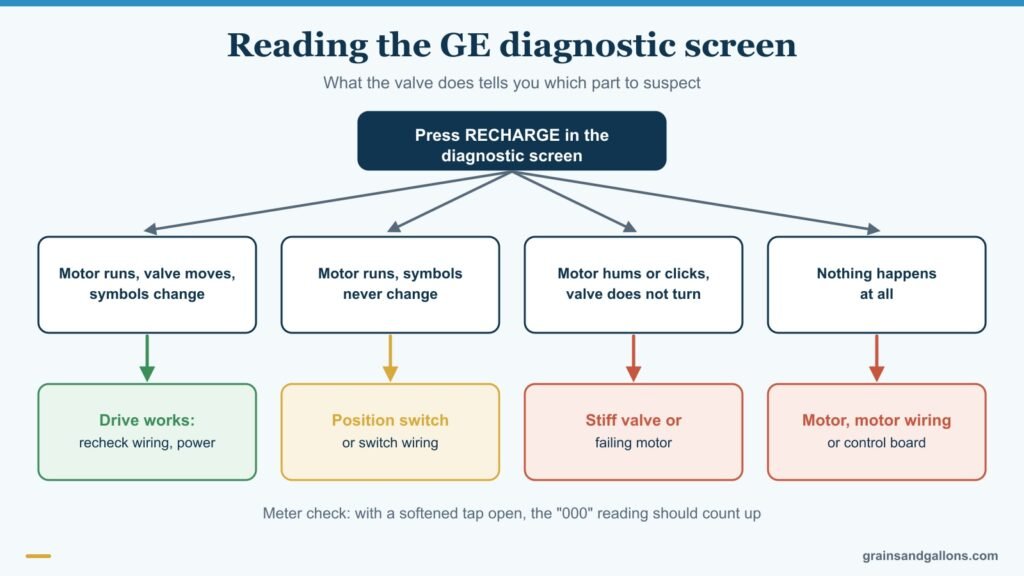
- Press and hold MODE/SET for 3 seconds, then keep pressing it until "000" appears. The number of extra presses differs between manual versions.
- The digits show the water meter. Open a softened tap and the count should climb.
- Press RECHARGE to step the valve through each cycle and watch the position switch symbols change.
- Press UP for days powered, or DOWN for the regeneration count.
The diagram above shows how to read the result. If the meter never counts, GE suggests pulling the sensor from the valve outlet and passing a small magnet in front of it; a reading means the turbine may be binding. For motor-versus-valve problems, see our softener motor not turning guide and the guide to a softener stuck in one cycle position.
Numbered Err 01 to Err 05 on older GE softeners

Earlier models such as the GXSF30H show a two-digit code. Their manual points Err 01 and Err 03 at the motor or wiring harness, Err 02 and Err 04 at the position switch, and Err 05 at the control board, with the control listed as a possible cause for all of them. Clearing is the same, but that manual says to wait at least 6 minutes.
Be wary of online code lists. Third-party sites give conflicting meanings for "Err 1" and "Err 2," including low salt, which no GE manual we've read supports. Find the manual for your exact model through GE Appliances' literature search.
A flashing blue light without Err means something else
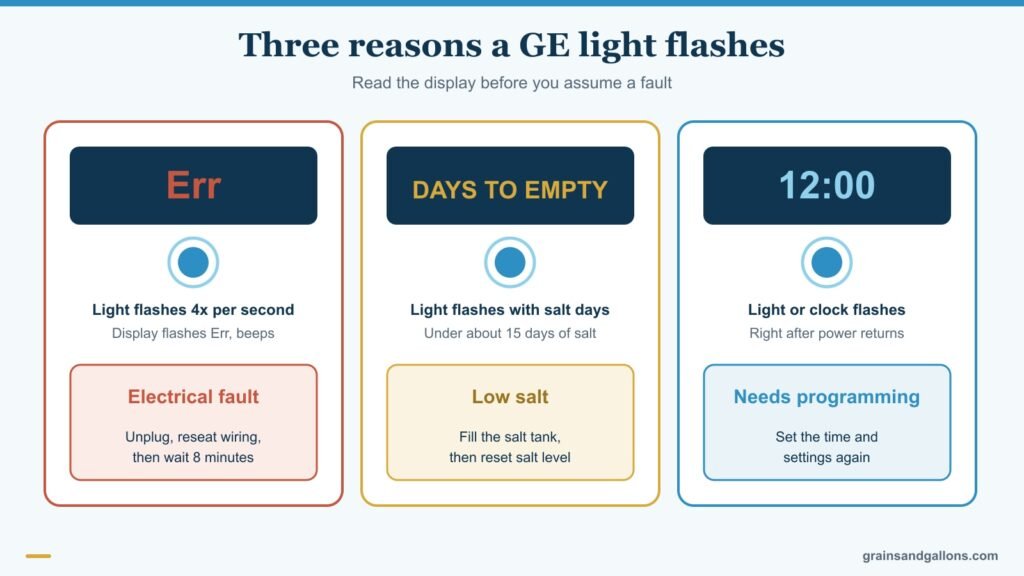
If DAYS TO EMPTY flashes with the light, salt is low, under about 15 days. Fill the tank and reset the salt level. If the light or clock flashes after a power cut, the control needs reprogramming; it still softens but may regenerate at the wrong hour. If the salt is full and the water is still hard, check for a salt bridge.
Prove the repair with a manual recharge

With a steady clock, hold RECHARGE for 3 seconds to enter Fill, then press once for each stage. Watch water enter the brine well, the brine level drop over 15 to 20 minutes, and a fast drain flow in backwash and rinse. A slow flow points to a plugged distributor, flow plug or drain hose. For the general method, see how to manually regenerate a water softener.
Don't treat the SoS restart as a fix
Holding MODE/SET until the display changes twice, pressing UP to "SoS," then MODE/SET restarts the controller. It helps with scrambled settings after a power event but won't cure Err, and you'll need to re-enter time and hardness. Penn State Extension's water softening guide explains water testing if you don't know your hardness.
FAQ
Why is my GE water softener beeping?
A beep every 30 seconds during daytime hours means the control is showing Err. Press any button to silence it, then unplug the transformer, reseat loose wiring and wait 8 minutes after plugging back in.
How do I reset my GE water softener error?
Unplug the transformer, fix the cause, plug it back in and wait 8 minutes. No button combination clears Err without fixing the fault.
What does a flashing blue light on a GE water softener mean?
Four flashes per second with Err means a fault. A flashing light with DAYS TO EMPTY means low salt. A flashing light or clock after a power cut means it needs reprogramming.
Can I use water while my GE softener shows Err?
Yes, but it may not be softened if the valve stopped mid-cycle. If water runs to the drain constantly, put the softener in bypass.
Are GE replacement parts still available?
It depends on the model's age, so call GE Appliances with your model and serial number first. If an older unit needs a board and a motor, compare replacements; see GE vs Morton and GE vs Whirlpool.
Most GE water softener error codes end at a loose connector
GE water softener error codes look alarming, but the manual's first suspect is wiring that has worked loose. Reseat the board, switch and motor plugs, power-cycle and give it the full 8 minutes. If Err comes back, the diagnostic screen tells you whether the switch, motor or valve is to blame, and a manual recharge proves the repair.