

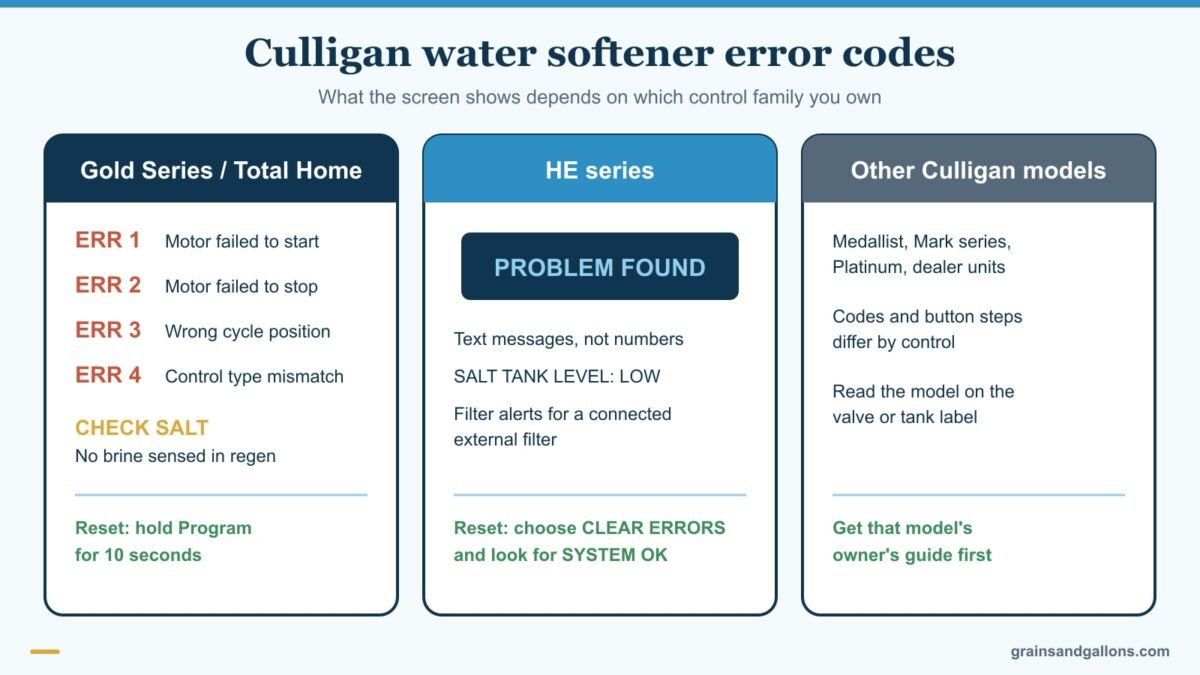
Quick Answer: Culligan water softener error codes depend on the control. On Gold Series and Total Home units, ERR 1 through ERR 4 are valve motor or position faults: hold the Program key for 10 seconds to make the control re-check itself, and call your Culligan dealer if the code returns. CHECK SALT means no brine was sensed during regeneration, so look for an empty tank or a salt bridge first. HE models show PROBLEM FOUND instead of numbers, which you clear from the on-screen menu.
The beeping started this afternoon, and now the softener screen shows something you've never seen. Before you call anyone, know this about Culligan water softener error codes: Culligan has sold several generations of controls, and they don't speak the same language. A code that means "motor stalled" on one series doesn't exist on another. So step one is working out which family you have.
In this guide
- Identify your Culligan control family before reading any code
- Culligan water softener error codes on Gold Series and Total Home
- Culligan CHECK SALT: the alert you can usually clear yourself
- What PROBLEM FOUND means on Culligan HE softeners
- Blank screen and no code? Start with power and bypass
- Leased or owned: who should repair a Culligan softener
- FAQ
- Reset once, then hand repeat codes to your dealer
Identify your Culligan control family before reading any code
Look at the front of the control and the label on the valve or tank.
- Gold Series or Total Home: older keypad controls with Program, Regen and arrow ("Toggle") keys. These show ERR 1, ERR 2, ERR 3, ERR 4 and CHECK SALT.
- HE series (HE 1", HE 1.25", HE Twin): a larger text screen with a menu. These show plain-language messages like PROBLEM FOUND instead of numbers.
- Anything else (Medallist, Mark series, Platinum, rebranded dealer units): codes and button steps differ. Find the model on the label and ask your dealer for that owner's guide. Culligan posts many of them online.
The details below come from two Culligan documents: the Gold Series and Total Home Automatic Water Conditioner Owner's Guide (error codes section) and the Culligan High Efficiency Automatic Water Softener Owners Guide, P/N 01021076 Rev H, which Culligan publishes on its website. Twin-tank owners should use the separate HE Twin owner's guide.
Culligan water softener error codes on Gold Series and Total Home
| Display | What the control is telling you | What you can do |
|---|---|---|
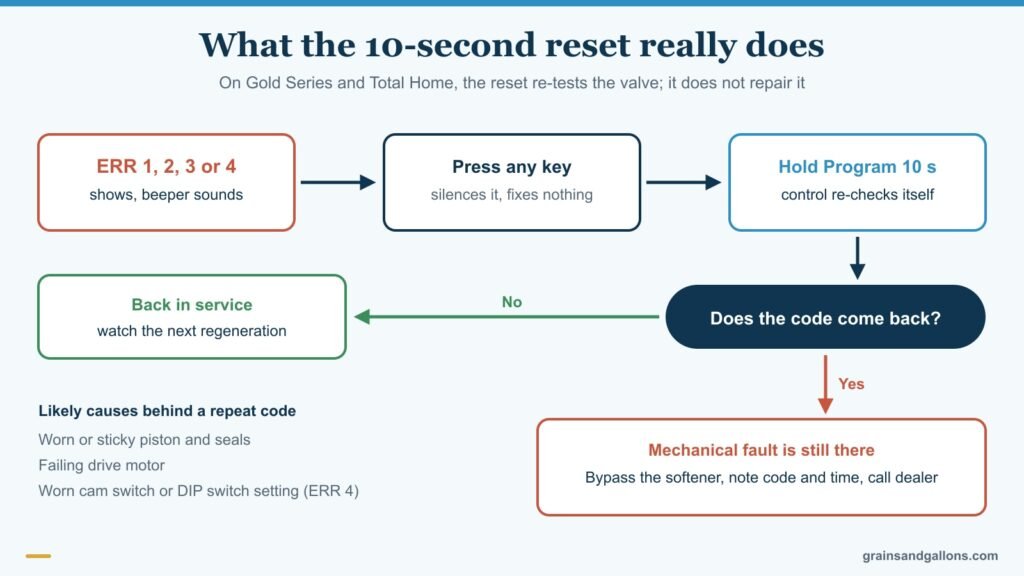
| ERR 1 – Motor failure to start | The valve didn't reach the position it was aiming for within 70 seconds. The control retries three times before it gives up and shows the code. | Hold Program for 10 seconds to reset. If it returns, call the dealer. |
| ERR 2 – Motor failure to stop | The cam switches report movement when the motor should be off. | Same reset. A repeat means a switch or wiring problem. |
| ERR 3 – Incorrect cycle position | The control thinks the valve should be in one position, but the cam switches say it's in another. | Same reset. Repeats point to the drive or switches. |
| ERR 4 – Control type doesn't match | The DIP switch settings (switches 3 and 4) don't match the valve's cycle type, 4-cycle or 5-cycle. | Usually appears after a board swap or someone flipping switches. Reset; if it stays, the dealer needs to set the switches. |
| CHECK SALT | In Aqua-Sensor mode, no brine was sensed during the brine rinse step. | Check salt level and break up any bridge. See the next section. |
How these codes behave:
- The beeper only sounds between 8 a.m. and 8 p.m. Press any key to silence it. Silencing fixes nothing.
- The reset is a re-test, not a repair. Holding Program for 10 seconds makes the control beep and check whether the fault still exists. If the motor is genuinely jammed, the code comes right back.
- ERR 1–3 are mechanical at heart. All three mean the valve isn't moving the way the board expects. Common physical causes are a worn or sticky piston and seals, a failing motor, or a worn cam switch. On most Culligan units these are dealer jobs, partly because parts come through dealers.
Manual regeneration on these controls: On Gold Series, press and hold Regen for about 5 seconds (the guide also mentions 3 seconds in another section, so hold until you hear the beep and the motor starts). On Total Home, hold Regen for 3 seconds. A quick press-and-release schedules a delayed regeneration for the set time instead; press it again to cancel. Our general guide on how to manually regenerate a water softener explains what each stage of that cycle does.
Culligan CHECK SALT: the alert you can usually clear yourself

The Aqua-Sensor probe looks for brine during regeneration. If it doesn't see any, it assumes the salt is gone or isn't dissolving. The usual suspects, in order:
- The tank is just empty. Refill it with clean pellet salt. If you're not sure what to buy, our roundup of the best water softener salt covers which pellets leave the least sludge.
- There's a salt bridge. The tank looks full, but a hard crust has formed above the water and the salt below has dissolved away. Push a broom handle down gently through the salt. If it hits a hard layer with empty space under it, that's your problem. Our guide to breaking up a salt bridge walks through it without cracking the tank.
- Salt mushing or sludge at the bottom, which can block brine from being drawn. See how to clear salt mushing if the bottom of the tank feels like wet sand.
After you add salt, Culligan's guide says to wait about four hours for brine to form. The alert only clears after a successful regeneration, so start one manually once the brine has had time to form. Until a good regeneration happens, Aqua-Sensor doesn't count as a valid regeneration trigger.
If CHECK SALT comes back with a full, loose tank, suspect a blocked brine line or a problem with the probe itself. Culligan's own troubleshooting advice also points to a dirty or corroded salt sensor in that situation, which is a dealer inspection.
What PROBLEM FOUND means on Culligan HE softeners
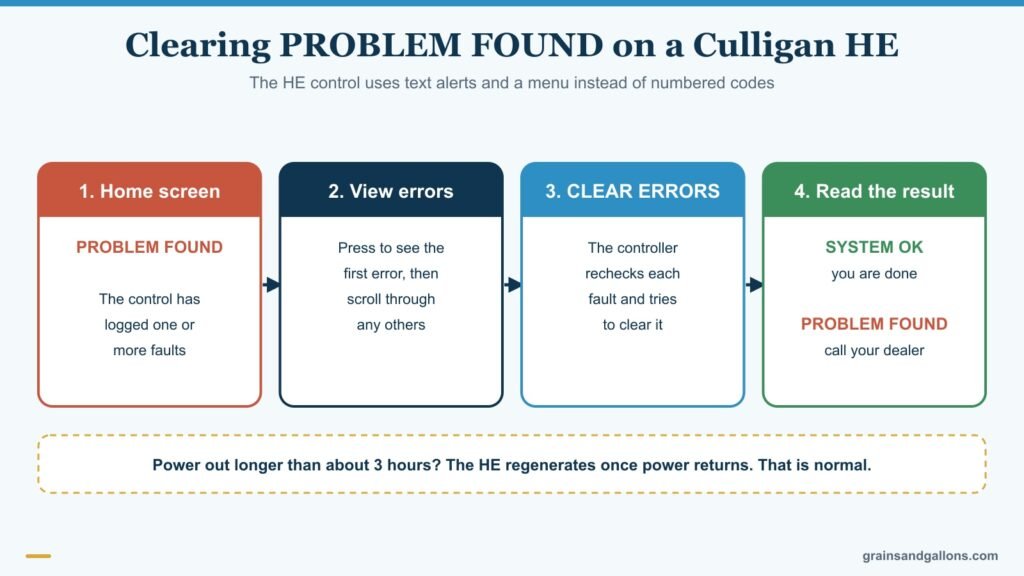
The HE controls replaced numbered codes with text. When something's wrong, the home screen shows PROBLEM FOUND. From there:
- Press to view the first error, then scroll through any others.
- Choose CLEAR ERRORS. The controller rechecks and tries to clear each one.
- If it shows SYSTEM OK, you're done. If PROBLEM FOUND comes back, the fault is still there and the guide says to contact your dealer.
Other HE messages:
- SALT TANK LEVEL: LOW – the brine tank probe sees low salt. The screen also offers an "approx days of salt remaining" estimate, so you can plan the next bag.
- EXT FILT CAP REM and REPLACE FILTER MEDIA – these relate to a connected external filter (for example a dealer-installed iron or carbon filter), not the softener resin. The owner's guide doesn't spell out the fix, so ask your dealer what's connected.
HE manual regeneration starts from the home screen: hold the button for at least 10 seconds for REGEN NOW, or about 3 seconds for REGEN TONITE. You can also go to Menu, then 2) MANUAL MODE, and pick Regen Now, Regen Tonite, Regen Off or Bypass.
One HE behavior confuses people: after a power outage longer than about three hours, the unit regenerates as soon as power and time are restored. That's on purpose, not a fault.
App alerts on connected Culligan systems
If your softener is linked to the Culligan Connect app or an Aquasential Smart control, alerts may reach your phone before you see the screen. Culligan lists low salt, power interruptions, valve position faults, restricted water flow, "service needed" and "unexpected water usage" among them. Low salt and power are yours to fix; a valve position or service alert is the app version of ERR 1–3 and goes to the dealer. Unexpected usage is often guests or a running toilet.
Blank screen and no code? Start with power and bypass
If the screen is blank, frozen or showing gibberish, you're past error codes. Check the outlet with a lamp, look for a tripped GFCI, and make sure the transformer plug is seated. Our guide to a blank display or unknown error code covers the power side in more detail.
Put the softener in bypass to keep water flowing while you wait for help. On the HE, the guide says to turn the blue bypass knob clockwise for bypass and counterclockwise to return to service, without overtightening. Gold Series valves use a push-style bypass marked for service position, so check the handle is fully pushed in when you return to normal.
Leased or owned: who should repair a Culligan softener

That depends on whether you own the softener or rent it. Many Culligan softeners are leased or under a dealer service plan. If yours is, opening the valve can cause problems with that agreement, and the dealer has to fix it anyway. Owned units are fair game for the salt and bypass checks above, but motor and switch repairs usually need dealer-only parts.
When a code keeps returning after you've cleared it:
- It clears, then returns at the next regeneration: that's the classic sign of a mechanical fault that only shows up when the valve moves. Write down the code and the time and give both to the dealer.
- CHECK SALT returns with a full tank: suspect a bridge you missed, a blocked brine line or the probe.
- ERR 4 after a repair visit: ask the tech to double-check DIP switches 3 and 4.
If the codes keep coming back on an older unit and you're weighing a replacement, our Culligan vs Hague comparison looks at how the two dealer-sold brands handle service and parts.
FAQ
How do I reset my Culligan water softener?
On Gold Series and Total Home controls, press and hold the Program key for 10 seconds. The control beeps and re-tests itself; if the fault is still present, the code returns. On HE models, open the PROBLEM FOUND screen and choose CLEAR ERRORS, then look for SYSTEM OK.
Why is my Culligan water softener beeping?
A beeping Gold Series or Total Home control is announcing an ERR code or CHECK SALT. The beeper only sounds between 8 a.m. and 8 p.m., and pressing any key silences it. Read the code on the screen before you press anything else.
Why does my Culligan say CHECK SALT when the tank is full?
Usually a salt bridge: a hard crust that hides an empty space above the water. Break it up, wait about four hours for brine to form, and run a manual regeneration. If the alert returns with loose salt in the tank, the brine line or the Aqua-Sensor probe needs a dealer check.
Does a Culligan softener regenerate after a power outage?
HE models regenerate on their own once power and time are restored after an outage longer than about three hours. That is normal behavior, not an error.
Can I fix Culligan error codes myself?
You can clear CHECK SALT, low-salt messages and power problems yourself. ERR 1, ERR 2 and ERR 3 point to the valve motor, piston or cam switches, and ERR 4 to DIP switch settings, so those are dealer repairs on most units, especially leased ones.
Reset once, then hand repeat codes to your dealer
Most Culligan water softener error codes give you one useful self-help move: a salt check for CHECK SALT or low-salt alerts, and a single reset for ERR 1–4 or PROBLEM FOUND. If the code comes back after that, the control is reporting a real mechanical fault. Put the unit in bypass, note the code and when it appeared, and let your Culligan dealer take it from there.