

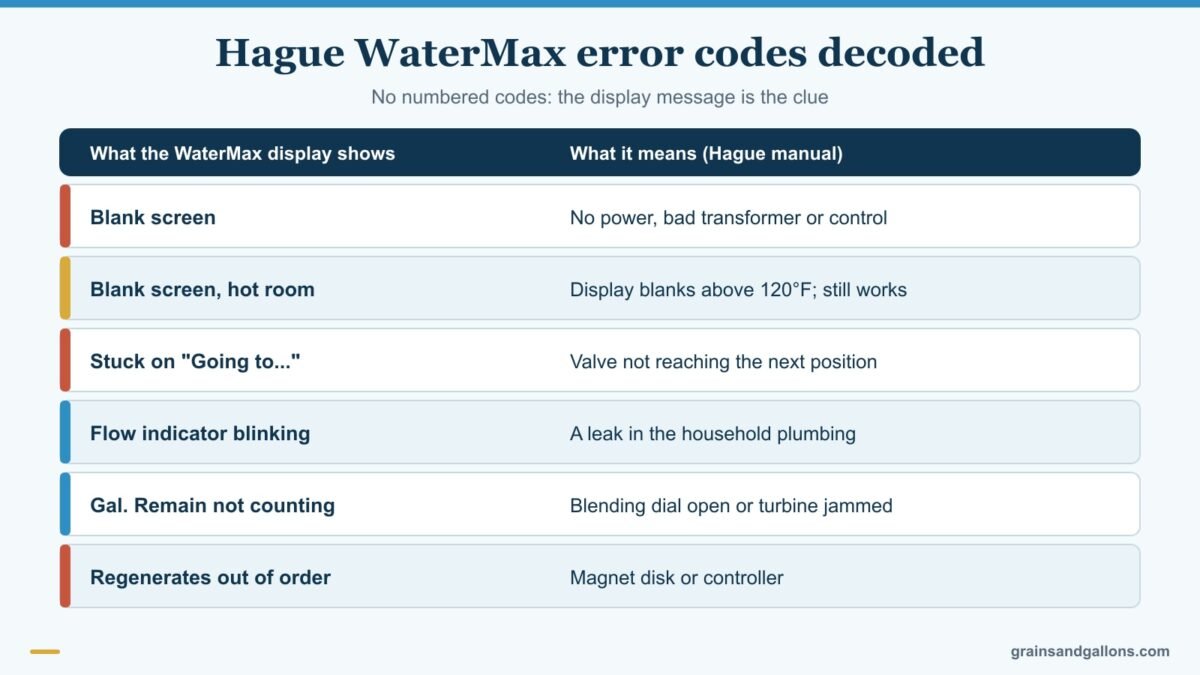
Quick Answer: Hague WaterMax error codes aren't numbers. The owner's manual for the 60-series models has no code table; the control reports problems through what it displays. A blank screen is usually power, so check for about 12 volts AC at the control. A display stuck on "Going to…" means the valve isn't reaching its next position. A flow indicator blinking with every tap closed means a leak in the house plumbing.
Most softeners throw a number when something breaks. The WaterMax doesn't. Its control talks in words ("Gal. Remain," "Going to 1"), so the clue is a message that won't clear or a screen that's gone dark. This decoder is built from the troubleshooting section of Hague's manual.
In this guide
- Why Hague WaterMax error codes show up as words
- A blank WaterMax screen: test the power before the board
- Stuck on "Going to…" means the valve isn't moving
- The flow indicator blinks with every tap closed
- No soft water and no message on the screen
- WaterMax buttons and settings at a glance
- FAQ
- Most Hague WaterMax error codes point to power, the valve or a leak
Why Hague WaterMax error codes show up as words
The source here is the Hague Quality Water installation and owner's manual for models 63MAQ, 63BEQ, 63MXQ, 63MDQ, 62AMQ, 62APQ, 62AKQ and 62AJQ, viewable page by page on ManualsDir. Troubleshooting is on pages 17–18 and the buttons on page 8. A newer WaterMax may show messages this one doesn't, so get the matching manual from your dealer or Hague Quality Water using the model number on the label.
| What you see | What it usually means | First check |
|---|---|---|
| Blank screen | No power at the control, or a failed control | Transformer, outlet, then voltage |
| Blank screen in a hot room | Display blanks above 120°F; the softener still works | Ventilation near furnaces or in hot garages |
| Stuck on "Going to…" | Valve isn't reaching the next position | Magnet disk, debris, drive end cap |
| Flow indicator blinking, no water in use | Water moving through the meter | Leak in the house plumbing |
| "Gal. Remain" not counting down | Meter isn't reading | Blending dial open or turbine jammed |
| Regenerating out of order | Control isn't stepping through cycles | Magnet disk or controller |
"Going to 1" on its own is normal. It's what the WaterMax shows when a regeneration starts, and it only means trouble if it never moves on.
A blank WaterMax screen: test the power before the board

The manual's fix for a dead display is an elimination order. Follow it, because the control board is the expensive part and the last suspect.
- Confirm the transformer is plugged in and the outlet isn't on a light switch.
- Check the outlet with a lamp or phone charger.
- Measure the voltage at the control. You should see about 12 volts AC. Below 10 VAC or above 14 VAC, replace the transformer.
- Only with 12 VAC present and a blank screen does the manual point to replacing the computer control.
Before step 4, feel the room. If it's above 120°F near the unit, the display can blank without affecting operation.
Testing for 12 volts AC
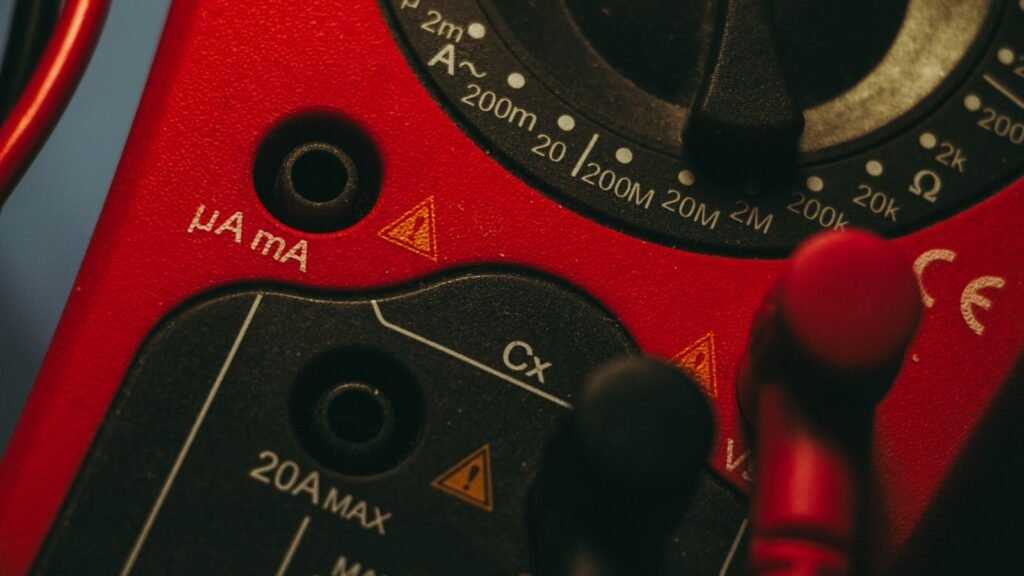
A basic multimeter set to AC volts does the job. Probe the transformer leads where they connect at the control. If you're not comfortable near the outlet, a dealer or electrician can check it in minutes.
Stuck on "Going to…" means the valve isn't moving
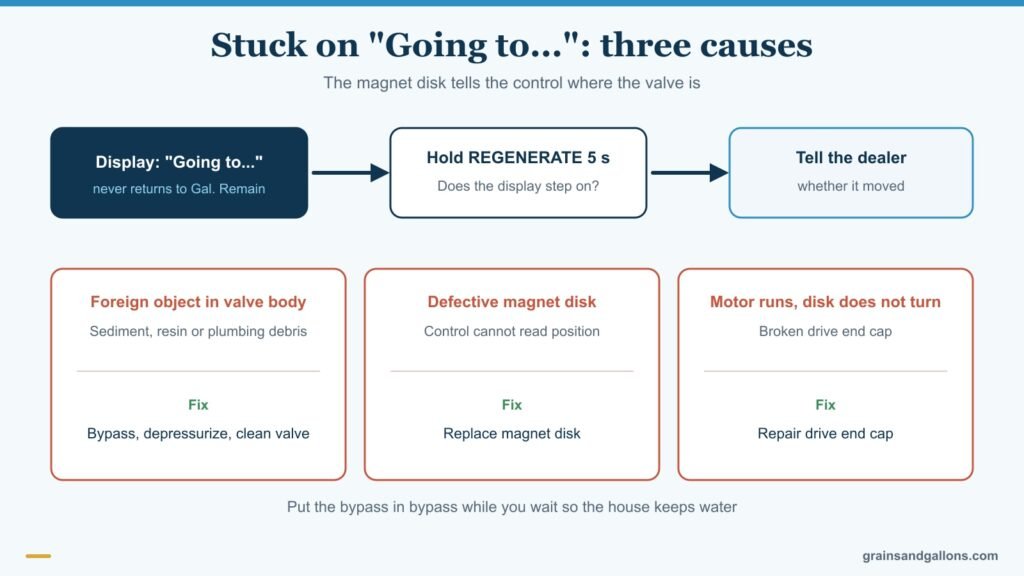
The WaterMax uses a magnet disk in the drive end cap to tell the control where the valve is. If the control never sees the next position, the display hangs and the unit stays in regeneration. The manual lists three causes:
- A foreign object in the valve body, such as sediment, resin or debris from plumbing work. Clearing it means bypassing, depressurizing and opening the valve body, which is usually dealer work.
- A defective magnet disk the control can't read.
- The motor running while the magnet disk doesn't turn, which points to a broken drive end cap.
One easy check first: press and hold REGENERATE for about 5 seconds. That starts a manual regeneration and shows "Going to 1," and the same button advances through cycles. If the display steps forward, the drive can still move. Tell the tech either way.
Put the bypass in bypass while you wait. The manual says to turn the handle until the piston stops and not to force it.
The flow indicator blinks with every tap closed

This isn't a softener fault. The manual's only listed cause for the water-flowing indicator blinking with no water in use is a leak in the household plumbing. Walk the house:
- Lift toilet lids and listen. A leaking flapper is the usual culprit.
- Check outdoor faucets, the water heater relief valve discharge pipe and the fridge supply line.
- Close toilet supply valves one at a time and watch whether the blinking stops.
A small, constant leak also uses up softener capacity every day, so fixing it saves salt.
If the opposite happens and no flow shows while water runs, the manual says the turbine is jammed; remove the bypass valve and clear debris from it. If "Gal. Remain" won't count down, make sure the blending dial is closed.
No soft water and no message on the screen
Many WaterMax problems show nothing at all. The manual's table lists these causes to rule out before blaming the control:
- Bypass left in bypass after plumbing work.
- An extended power outage. Reset the time in Customer Settings and confirm hardness and other settings.
- No salt, or a salt bridge in the brine tank.
- A plugged injector, brine line, air check or refill flow control. The manual suggests cleaning the injector nozzle and throat with a wooden toothpick; see our guide to cleaning a softener injector.
- A pinched or frozen drain line.
- Harder raw water, which happens on wells. Penn State Extension's water softening guide explains why retesting hardness matters.
Too much water in the brine tank shares the same causes, plus a sticking brine valve piston. Our brine tank full of water guide covers that.
WaterMax buttons and settings at a glance
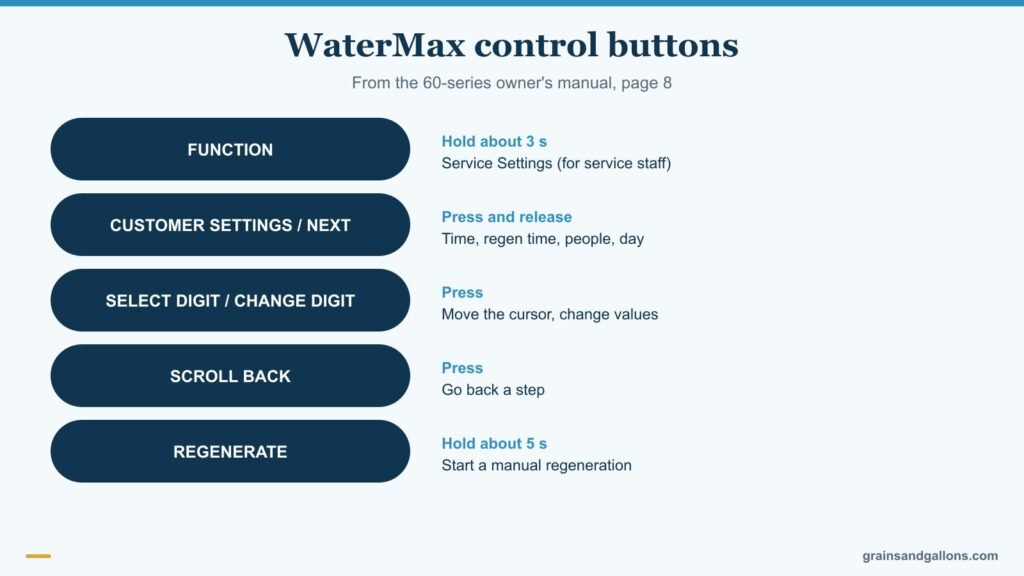
- FUNCTION (hold about 3 seconds): Service Settings, which shows "Set language???". This is meant for service personnel.
- CUSTOMER SETTINGS/NEXT: time of day, regeneration time, number of people, day of week.
- SELECT DIGIT / CHANGE DIGIT: move the cursor and change values.
- SCROLL BACK: go back a step.
- REGENERATE (hold about 5 seconds): start a manual regeneration.
The manual warns not to engage the "Turbine Test" option in service settings. Leave it alone.
FAQ
Does the Hague WaterMax have error codes?
Not numbered ones in the 60-series manual. Problems show as a blank screen, a message that won't clear, or a blinking flow indicator.
What does "Going to 1" mean on a Hague WaterMax?
It means a regeneration has started and the valve is moving to cycle 1. It's normal unless it stays there and never returns to "Gal. Remain."
Why is my Hague WaterMax display blank?
Usually no power: an unplugged transformer, a switched outlet or a failed transformer. Check for about 12 VAC at the control. A room above 120°F can also blank the display.
How do I manually regenerate a Hague WaterMax?
Press and hold REGENERATE for about 5 seconds until "Going to 1" appears.
Can I fix a stuck WaterMax valve myself?
You can check power and try a manual regeneration. Replacing the magnet disk, repairing the drive end cap or opening the valve body is usually dealer work.
Most Hague WaterMax error codes point to power, the valve or a leak
Hague WaterMax error codes are really three questions: is power reaching the control, is the valve reaching its positions, and is water moving when it shouldn't? Test the transformer before buying a board, try a manual regeneration before calling, and hunt the leak before suspecting the meter. If you're on a second board or a quote nears a new system's price, our Kinetico vs Hague and Culligan vs Hague comparisons can help. For brands with numbered codes, start with our softener error code or blank display guide.