

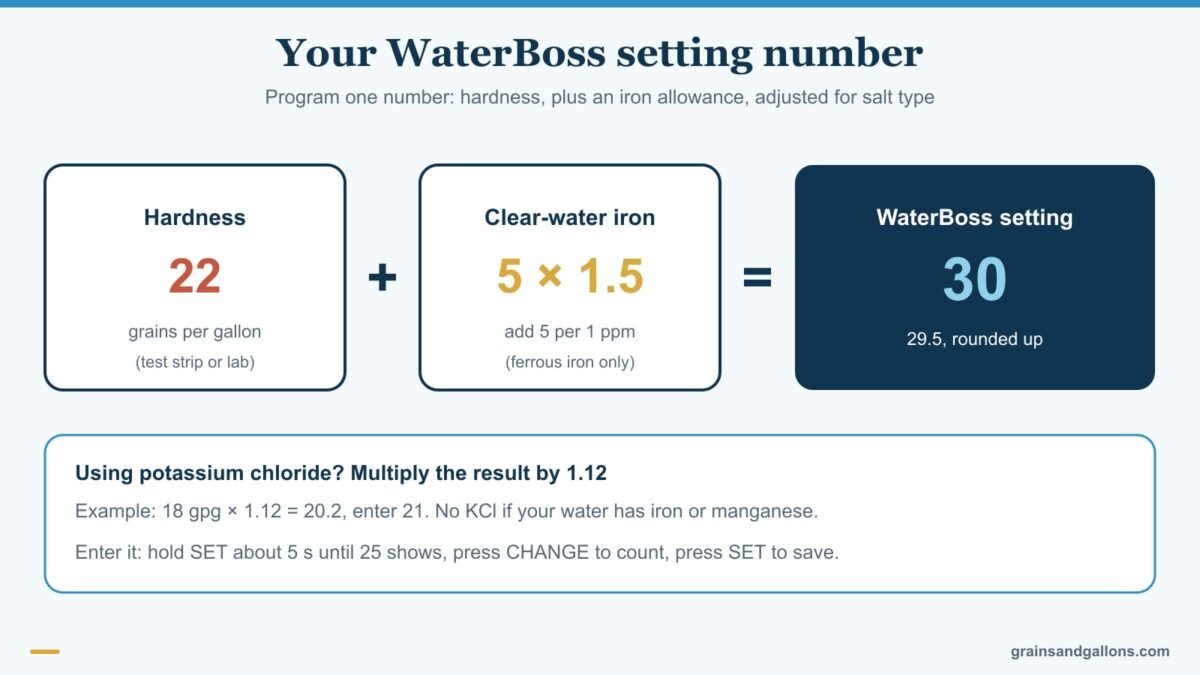
Quick Answer: Here is how to program WaterBoss softeners: hold Set for about 5 seconds until "25" shows, press Change until the display matches your setting number, then press Set to save. Your setting number is your hardness in grains per gallon, plus 5 for each 1 ppm of clear-water iron, multiplied by 1.12 if you use potassium chloride. For mode, clock and regeneration time, hold Set and Change together for 3 seconds.
Out of the box, a WaterBoss runs on a default setting of 25, which has nothing to do with your water. Learning how to program WaterBoss units is mostly about getting one number right: the main setting, plus a short list of advanced options you can usually leave at their defaults.
This guide follows WaterBoss's current owner's manual for the Model 700, 900 and 950 softeners, which WaterBoss posts as a downloadable PDF. If your controller has SET and IMMEDIATE RECHARGE buttons instead, jump to the section on older controllers near the end.
In this guide
- Step 1: Work out your setting number on paper
- How to program WaterBoss hardness: enter the number
- Fine-tune efficiency, mode and the clock
- Step 4: Run a test regeneration and watch each cycle
- powerClean keeps iron out of the resin (700 and 900)
- Older WaterBoss controllers use different buttons
- Get the setting number right and the rest takes minutes
- FAQ
Step 1: Work out your setting number on paper

Do this before you touch the softener. The manual builds the number in three parts.
Start with hardness in grains per gallon. WaterBoss includes test strips. If the color lands between two readings, use the higher one. If you're on a well or the strips feel vague, a drop-count kit gives a firmer number; see our picks for the best water hardness test kits. A lab report in mg/L or ppm converts at roughly 17 mg/L per grain, the figure Penn State Extension gives in its water softening guide. The same guide notes that reduced (clear-water) iron is removed by a softener while oxidized iron clogs the resin, which is why the iron step below matters.
Add 5 for every 1 ppm (mg/L) of clear-water (ferrous) iron. The manual is specific that this applies to ferrous iron only. Ferric, organic and colloidal iron aren't covered by the adjustment, and WaterBoss tells you to call its HelpLine about those.
Multiply by 1.12 if you use potassium chloride instead of salt. The manual also says not to use potassium chloride at all if your water has iron or manganese.
| Water and salt | Math | Setting number |
|---|---|---|
| 14 gpg, no iron, sodium chloride | 14 | 14 |
| 22 gpg, 1.5 ppm ferrous iron, sodium chloride | 22 + 7.5 | 30 (round up) |
| 18 gpg, no iron, potassium chloride | 18 × 1.12 | 21 (round up) |
| 10 gpg, 2 ppm iron, potassium chloride | Don't. The manual says no KCl with iron. | Switch to salt: 20 |
Check your model's limit. The manual's maximum is 70 gpg for the 700 and 90 gpg for the 900. For the 950, the specifications table lists 35 gpg while the programming section says 70. That's a conflict in the manual, so if your number is above 35 on a 950, call the WaterBoss HelpLine (1-800-437-8993) before relying on it.
How to program WaterBoss hardness: enter the number
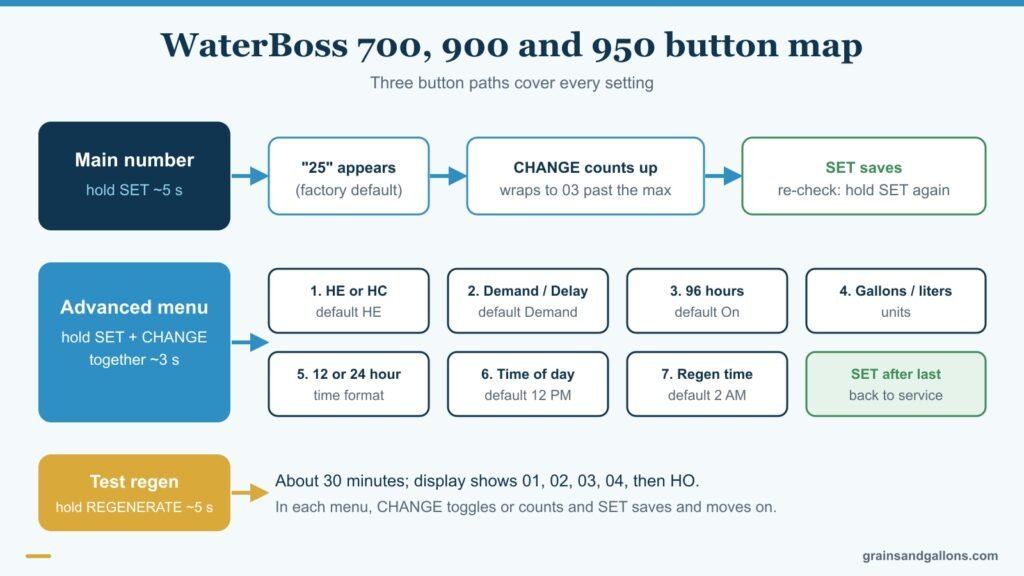
- Press and hold Set for about 5 seconds until 25 appears.
- Press Change to count up to your number. If you go past the maximum (70 on the 700 and 950, 90 on the 900), it wraps around to 03 and you keep going.
- Press Set to save.
- To double-check, hold Set for about 5 seconds again and read the number.
On a typical city-water home you could stop here. The general logic behind the number is in our guide on how to set hardness on a water softener.
Fine-tune efficiency, mode and the clock
Hold Set and Change together for 3 seconds. The screen flashes, then HC appears. Each setting uses the same pattern: Change toggles or counts, Set saves and moves on.
- HC / HE. HE (High Efficiency, the default) uses less salt and regenerates more often. HC (High Capacity) uses more salt per regeneration and goes longer between them. HE suits most homes; HC makes sense if frequent regenerations bother you or you see the unit regenerating too often.
- Mode: Demand or Delay. Demand (the default) regenerates as soon as capacity runs out, whenever that happens. Delay waits for the set regeneration time, usually overnight. Pick Delay if you don't want a regeneration starting while someone's in the shower.
- 96 Hours: On or Off. On (the default) forces a regeneration if it's gone four days without one. The manual says to leave it On if your water has iron, and that most municipal-water 950 owners can turn it Off.
- Units: gallons or liters.
- Time format: 12 or 24 hour. In 24-hour, 00 is midnight.
- Time of day: to the nearest hour. The default is 12 PM.
- Regeneration time: the default is 2 AM. It only matters in Delay mode; our guide on what time a softener should regenerate explains why the small hours work best.
Press Set after the last one and you're back in service. The display then shows gallons of soft water remaining, in hundreds, so 12 means about 1,200 gallons.
After a power outage
Settings are kept indefinitely, but the time of day may drift or reset. If it does, fix it through this same menu. It matters most in Delay mode, where a wrong clock means regenerations at the wrong hour.
Step 4: Run a test regeneration and watch each cycle
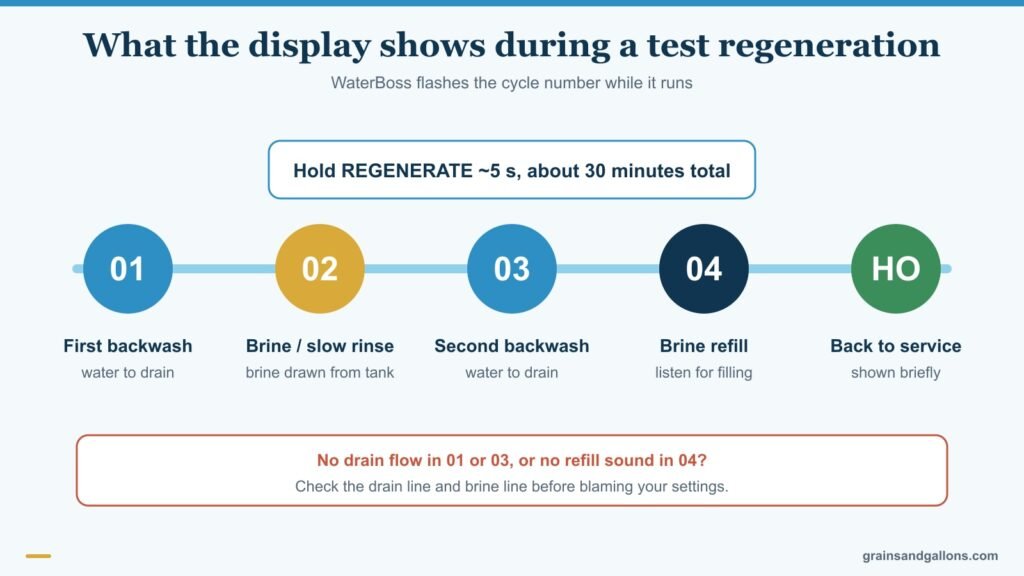
Hold Regenerate for about 5 seconds. A full regeneration takes about 30 minutes, and the display flashes the cycle you're in:
| Display | Cycle |
|---|---|
| 01 | First backwash |
| 02 | Brine / slow rinse |
| 03 | Second backwash |
| 04 | Brine refill |
| HO | Briefly, on the way back to service |
On a new install, watch for water going to the drain during 01 and 03, and listen for the brine tank refilling in 04. If you see E1 through E5 instead, that's a fault, not a programming problem. Our WaterBoss error codes guide lists each one.
powerClean keeps iron out of the resin (700 and 900)
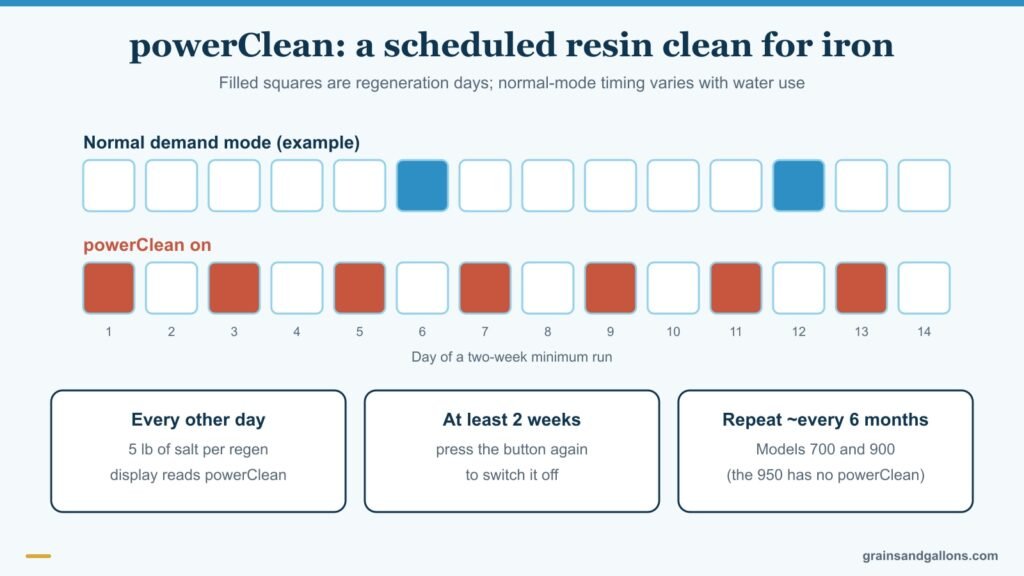
If you have iron, the powerClean button switches the unit to regenerating every other day with 5 lb of salt, regardless of the setting number. The display shows "powerClean" while it's on. The manual says to leave it on for at least two weeks and repeat about every six months. Press the button again to turn it off. The 950 doesn't have this feature.
The manual also suggests an iron cleaning agent or iron-removing salt for continuous use when iron is present. Our explainer on softener resin and iron cleaners covers the difference.
Older WaterBoss controllers use different buttons
If your buttons say SET, IMMEDIATE RECHARGE and powerClean, you have an older controller. WaterBoss's 1998 installation and service manual (form 93966) describes it this way:
- Hardness: each press of SET adds one, up to 70 for the waterBoss and 90 for the BigBoss.
- Time and regen time are entered as 24-hour military time, using a mix of SET and IMMEDIATE RECHARGE presses. Each step has to happen within about 10 seconds or the display jumps back. Entering 88 as the regen time puts it back into demand mode.
- Iron and potassium chloride rules were different. That manual said to add 15 grains when iron was present and pH was 7 or higher, as a temporary measure until a full water test, and to multiply by 1.12 for potassium chloride.
- Salt and capacity were set with DIP switches on the circuit board behind the backplate.
If that's what you have, get the manual for your exact model from WaterBoss instead of guessing.
Get the setting number right and the rest takes minutes
Once you know how to program WaterBoss softeners, the button work is the quick part. The setting number is where mistakes happen: test hardness properly, add the iron allowance, adjust for potassium chloride, and stay under your model's limit. Leave HE and Demand mode alone unless you have a reason, and run one test regeneration to confirm it works. If you're still choosing a unit, our WaterBoss vs Whirlpool comparison covers capacity, footprint and features.
FAQ
What should I set my WaterBoss hardness to?
Enter your hardness in grains per gallon, add 5 for each 1 ppm of clear-water iron, and multiply by 1.12 if you use potassium chloride. Round up.
Should I use HE or HC mode on a WaterBoss?
HE (High Efficiency) is the default and uses less salt per regeneration, so it suits most homes. HC (High Capacity) uses more salt but regenerates less often, which helps if frequent regenerations are a nuisance.
How do I force a WaterBoss to regenerate?
Hold the Regenerate button for about 5 seconds. The cycle takes about 30 minutes and the display counts through 01, 02, 03 and 04 before returning to service.
Do I need to reprogram a WaterBoss after a power outage?
No. The manual says settings are kept indefinitely, but the time of day may drift or reset. Check the clock in the advanced menu, especially if you use Delay mode.