

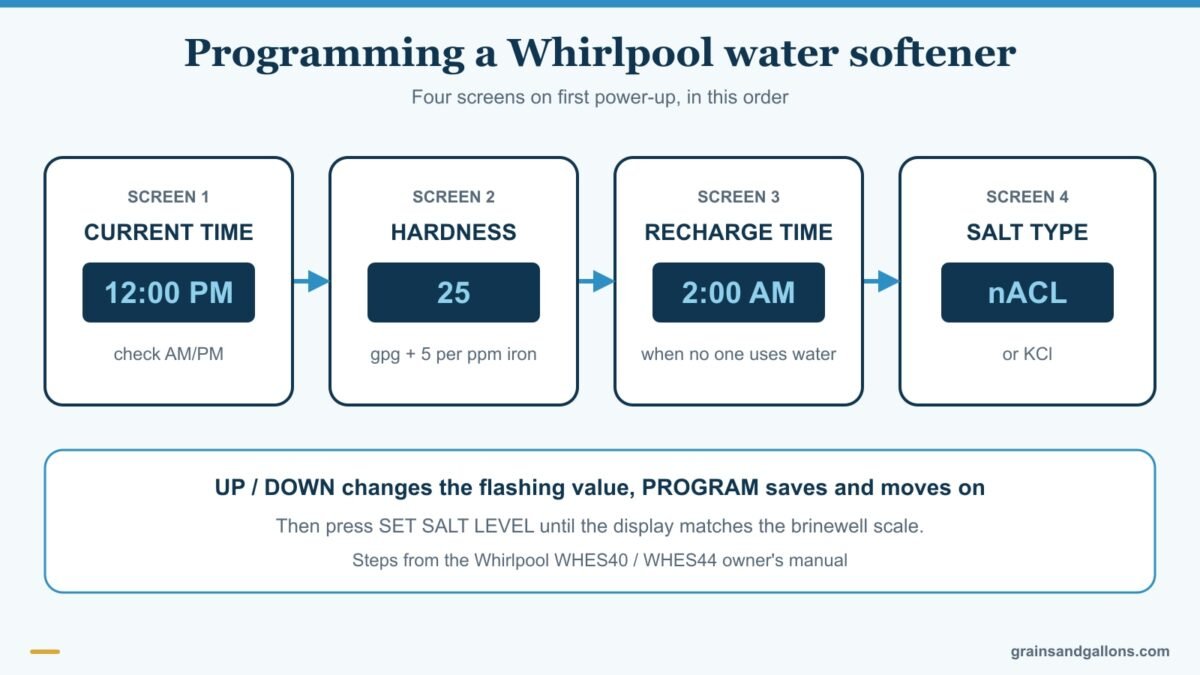
Quick Answer: Here's how to program Whirlpool water softener models WHES40 and WHES44: plug it in, and when 12:00 PM flashes, set the time with UP/DOWN and press PROGRAM. Set HARDNESS (grains per gallon, plus 5 for every 1 ppm of clear-water iron), press PROGRAM, set RECHARGE TIME (2:00 AM default), press PROGRAM, pick NaCl or KCl, and press PROGRAM to finish. Then press SET SALT LEVEL to match the brinewell scale.
The display is blinking 12:00 PM and the softener is waiting for answers. If you're wondering how to program Whirlpool water softener controls, the setup is short: four screens on the main menu, a salt level button, and an optional advanced menu most people never touch. The part that trips people up isn't the buttons. It's knowing what number to type in for hardness.
These steps come from Whirlpool's owner's manual for the WHES40 and WHES44 (document W11484759, Rev B); you can find manuals for your model in Whirlpool's product manual library. Other models, such as the WHES30E, WHES40E and the Pro Series, use similar controls but aren't covered by that manual, so check your unit's label if a screen doesn't match.
In this guide
- Numbers to collect before you press PROGRAM
- How to program Whirlpool water softener models WHES40 and WHES44
- Set the salt level so the low-salt alert works
- Advanced options: salt efficiency, iron and forced recharges
- Run a test recharge, then check the clock after outages
- Hardness is the one setting worth double-checking
- FAQ
Numbers to collect before you press PROGRAM

You'll need two numbers before you touch the softener:
- Hardness in grains per gallon (gpg). Your city's water quality report may list it, often in mg/L or ppm. One grain per gallon is roughly 17 mg/L, according to Penn State Extension's water softening guide, so divide ppm by 17. On a well, test it yourself. Our picks for the best water hardness test kits include drop-count kits that are more precise than strips.
- Iron in ppm, if you're on a well. This changes the hardness number you enter. Penn State notes that a softener removes dissolved (clear-water) iron, but iron that has already oxidized clogs the resin, so know which kind you have.
How to program Whirlpool water softener models WHES40 and WHES44
The buttons you'll use are PROGRAM, UP, DOWN, RECHARGE and SET SALT LEVEL. Tap UP or DOWN to move slowly, or hold them to move fast.
- Plug in the power supply. The model code and software version flash for a moment. Then CURRENT TIME appears and 12:00 PM flashes. If you don't see it, press PROGRAM until you do.
- Set the current time. Use UP or DOWN, and check the AM/PM indicator. Press PROGRAM.
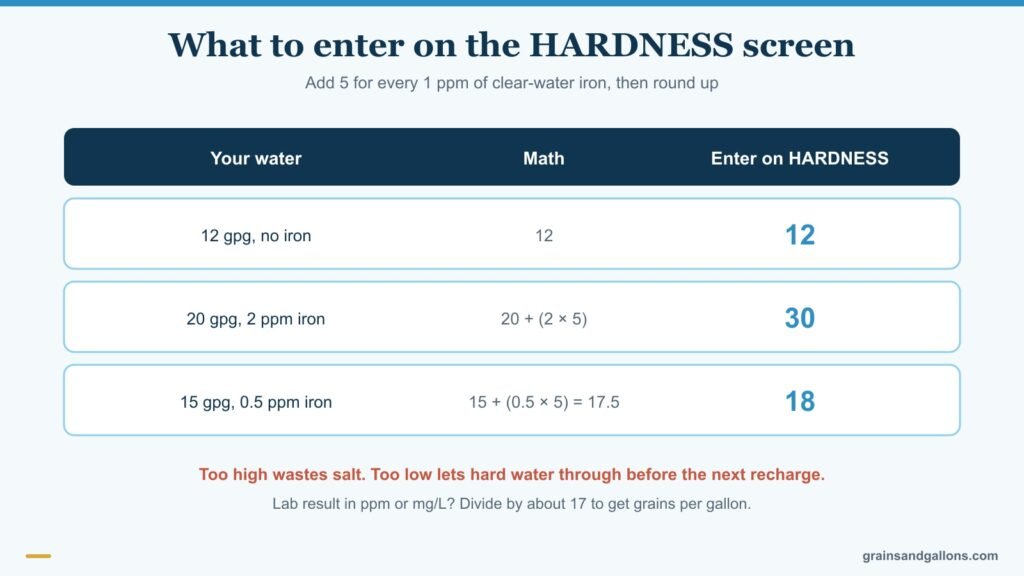
- Set hardness. The screen shows HARDNESS and a flashing number (default 25). Enter your number and press PROGRAM. With clear-water (ferrous) iron, the manual's rule is to add 5 for each 1 ppm of iron, so 20 gpg with 2 ppm iron becomes 30. Rounding up a little is fine. Way too high wastes salt; too low lets hard water through before the next recharge. Our hardness setting guide explains that tradeoff.
- Set recharge time. RECHARGE TIME shows with a flashing 2:00 AM. Change it if you need to and press PROGRAM. Pick a time when nobody's using water, because the house gets hard water during a recharge. Our piece on the best time for a softener to regenerate covers shift workers and early risers.
- Choose salt type. The screen flashes nACL. Switch to KCl if you use potassium chloride. Press PROGRAM to enter it, then PROGRAM again to return to the normal display.
With potassium chloride, the manual says to keep no more than 60 lb in the tank and not to fill above level 4 on the brinewell scale.
Set the salt level so the low-salt alert works
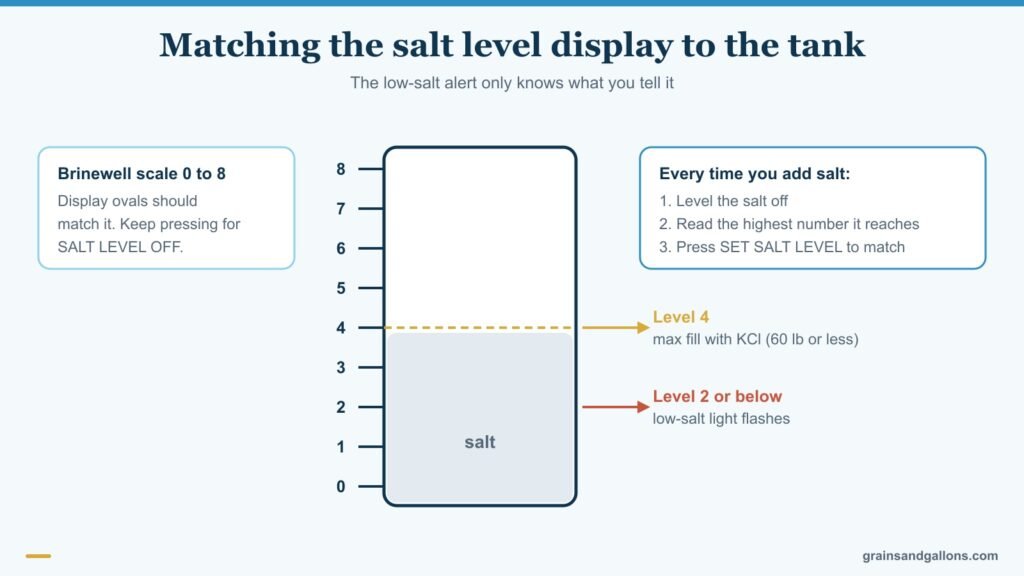
This doesn't change how the softener works. It just tells the low-salt alert where it's starting from.
- Level off the salt in the tank.
- Find the highest number on the brinewell scale (0 to 8) that the salt reaches.
- Press SET SALT LEVEL until the ovals on the display match that number.
Do this every time you add salt. The low-salt light starts flashing at level 2 or below. If you'd rather not use it, keep pressing SET SALT LEVEL until SALT LEVEL OFF appears.
Advanced options: salt efficiency, iron and forced recharges
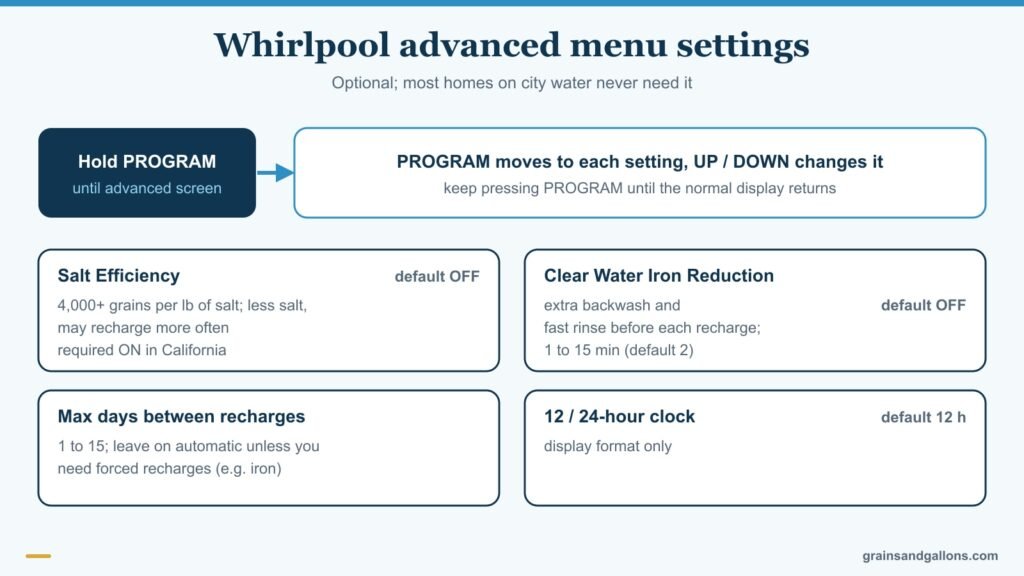
Press and hold PROGRAM until the advanced screen appears. PROGRAM moves to each setting and UP/DOWN changes it:
- Salt Efficiency (default OFF). Runs at 4,000 grains per pound of salt or better. It uses less salt but may recharge more often. The manual notes it's required ON in California.
- Clean/Clear Water Iron Reduction (default OFF). Adds a backwash and fast rinse before each recharge, meant for water with iron. When it's on, you can set its duration from 1 to 15 minutes; the default is 2.
- Maximum days between recharges, 1 to 15. The manual says to leave this on automatic unless you need forced recharges, for example with iron.
- 12/24-hour clock. The default is 12-hour.
The manual's count of how many presses it takes to exit isn't consistent, so just keep pressing PROGRAM until you're back at the normal display.
Run a test recharge, then check the clock after outages
- Recharge now: hold RECHARGE for 3 seconds until "RECHARGE" flashes.
- Recharge tonight: press and release RECHARGE. "RECHARGE SCHEDULED" flashes, and it recharges at your set time.
On a fresh install, a recharge now is a good check that water flows to the drain and the brine tank refills.
What a power outage does
The control holds hardness and recharge time through an outage. The display goes blank and no recharge happens while the power's out, and a recharge already in progress finishes when power returns. If the clock is flashing when power comes back, reset the time. If it's steady, you're fine.
Starting over with the SoS factory reset
Use this if the settings are scrambled or the control is acting strangely:
- Hold PROGRAM until the display changes twice and shows a flashing model code.
- Press UP a few times until SoS flashes.
- Press PROGRAM. The controller restarts.
- Go back through time, hardness, recharge time and salt type.
If you're seeing Err instead, that's a separate problem. Our Whirlpool error codes guide covers what each one means.
Hardness is the one setting worth double-checking
Once you know how to program Whirlpool water softener models, the button work takes five minutes. The setting that decides whether you get soft water without wasting salt is hardness: measure it, add 5 per ppm of clear-water iron, and round up slightly. Set the salt level each time you refill, and leave the advanced menu alone unless you have iron or live in California. Still choosing a unit? Our GE vs Whirlpool comparison looks at how the two big-box brands differ.
FAQ
What hardness should I set on my Whirlpool water softener?
Enter your water's hardness in grains per gallon. If you have clear-water iron, add 5 for every 1 ppm. A home with 20 gpg and 2 ppm iron would enter 30.
How do I make my Whirlpool softener regenerate right now?
Hold the RECHARGE button for 3 seconds until "RECHARGE" flashes. A single short press schedules a recharge for your set recharge time instead.
Does a Whirlpool softener lose its settings when the power goes out?
No. Hardness and recharge time are kept. If the clock is flashing when power returns, set the current time again.
How do I factory reset a Whirlpool water softener?
Hold PROGRAM until a flashing model code appears, press UP until SoS flashes, then press PROGRAM. The control restarts and you reprogram time, hardness, recharge time and salt type.
Should I turn on Salt Efficiency?
It uses less salt per recharge but may recharge more often. It's optional in most states and required ON in California, according to the manual.