


Quick Answer: For a Fleck 5600SXT manual regeneration, press and hold Extra Cycle for 5 seconds from the normal service screen. The valve goes straight to backwash and runs the full cycle on its own. To queue one for tonight instead, press Extra Cycle once: the service icon flashes, and another press cancels it. Add salt first if the tank was low.
A Fleck 5600SXT manual regeneration is the fix when the salt tank ran dry, you filled it back up, and the next scheduled regeneration is three nights away. Other good reasons: after a resin cleaner, after a long vacation, or to watch each stage when you suspect the softener isn't drawing brine.
On the 5600SXT it all runs through one button. Instructions below follow Pentair's 5600SXT Softener System manual, document 4005293 (PDF from Pentair), which covers the control on Pentair's 5600SXT softener series. Other brands use different buttons; our general manual regeneration guide covers those.
In this guide
Start it now or queue it for tonight

| You want | Do this | What the display does |
|---|---|---|
| Regenerate immediately | Hold Extra Cycle for 5 seconds | Jumps to step 1 (backwash) and counts down |
| Regenerate at the next scheduled time | Press Extra Cycle once | Service icon flashes |
| Cancel a queued one | Press Extra Cycle again | Flashing stops |
Queuing is the gentler choice when you're not in a hurry. The softener runs at its programmed regeneration time, usually the middle of the night, when nobody's showering. If anything else triggers a regeneration first, the manual says the queued request is cleared automatically.
Use "now" when you need soft water today or want to watch the cycle. Water used during regeneration isn't softened, and on a single-tank system the house gets untreated water while the valve is in cycle, so avoid running it while the water heater is refilling after showers.
Make sure you're on the normal service screen first. If the display shows a programming code such as TD or DO, button presses mean something else; wait a few seconds for it to time out.
Reading BW, BD, RR and BF on the display

During each step the display shows the step code and counts down the minutes left. While the valve is physically moving between steps, it flashes —- until it arrives.
- Backwash (BW). Water flows up through the resin and out to the drain, lifting the bed and flushing out sediment. Listen at the drain for steady flow. Cloudy or discolored water at the start is normal.
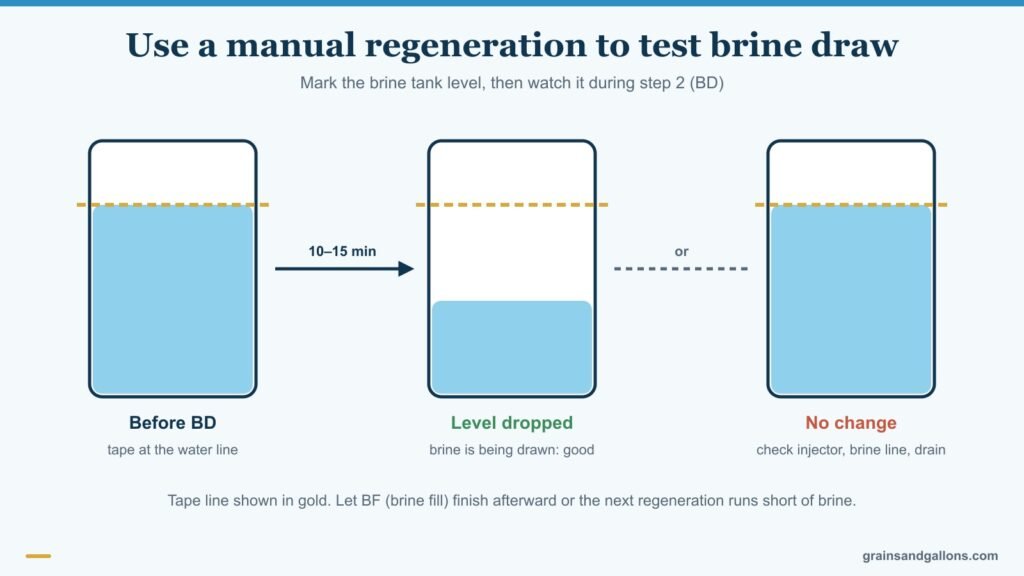
- Brine draw and slow rinse (BD). The valve pulls salty water from the brine tank through the resin, then slowly rinses it. The brine tank level should drop. This is the step that actually recharges the resin.
- Rapid rinse (RR). A fast downflow rinse flushes leftover brine to the drain and packs the bed.
- Brine fill (BF). Fresh water goes back into the brine tank to dissolve salt for next time.
After the last step it returns to service on its own. The manual doesn't give default step times because they're programmed per system: each can be set from 0 to 199 minutes, and a step set to 0 is skipped. Valves configured for double backwash run a second backwash, so you may see BW twice. Check your times in Master Programming if you want to know how long the whole cycle takes.
Stepping through cycles with Extra Cycle
During a regeneration, one press of Extra Cycle skips to the next step immediately. After the last step, one more press sends the valve back to service. This is for diagnosis, not for saving time:
- Checking brine draw. Start a regeneration, let backwash finish (or advance past it), then stand by the brine tank during BD. Mark the water level with tape. If it hasn't dropped after 10 to 15 minutes, the softener isn't drawing brine, and the usual suspects are the injector, brine line or drain. Our guide to no water in the brine tank covers the opposite problem with the same parts.
- Checking the drain line. Advance to backwash and look at the drain end. Weak or no flow points to a kinked or clogged line.
- Getting out of a regeneration started by mistake. Press Extra Cycle repeatedly to step through to service.
Why skipping brine fill backfires
If you skip BF, the brine tank doesn't get refilled, and the next regeneration runs with little or no brine. The resin won't recharge, and hard water shows up a few days later with no obvious cause. If you've skipped steps, run one complete regeneration afterward, or at least let a brine fill finish.
Getting soft water back after the salt ran out
If the resin went fully hard because the tank was empty, one regeneration often isn't enough to bring it all the way back.
- Fill the salt tank and wait a couple of hours so the water in it becomes brine. Fresh salt sitting in fresh water isn't brine yet.
- Hold Extra Cycle for 5 seconds and let the full cycle run.
- When it's done, test a cold soft-water tap with a hardness strip.
- If it's still a little hard, queue another one that night with a single press.
More on bouncing back is in what to do when a water softener runs out of salt.
When Extra Cycle won't start a regeneration
- Nothing happens when you hold the button: you're probably in a programming screen. Let it time out and try again from the service display.
- An error code appears: Err 0 to Err 3 point to cam, cycle-step, regeneration or memory faults. Our Fleck 5600SXT error codes guide explains each; Err 2 is cleared by exactly this manual regeneration.
- Power went out mid-cycle: the control saves the valve position and resumes from there when power returns. It won't start a new regeneration without power, so a missed one usually runs a day late.
- It regenerates on its own too often or too rarely: that's a programming job, not a button job. See how to program a Fleck 5600SXT.
If you find yourself forcing regenerations every week because the softener can't keep up, it may be undersized for your hardness. Our picks for the best Fleck water softeners include larger-capacity 5600SXT systems, and our Aquasure vs Fleck 5600SXT comparison helps if you're weighing an alternative.
Hold for now, tap for tonight, and let it finish
Every Fleck 5600SXT manual regeneration comes down to that rule: hold Extra Cycle for 5 seconds to regenerate now, tap it once to queue one for the programmed time, and let the cycle run through brine fill unless you're deliberately testing a step. If you do step through, finish with a full cycle so the brine tank is ready for the next one.
FAQ
How long does a Fleck 5600SXT manual regeneration take?
It depends on the step times programmed into your control. Each step can be set from 0 to 199 minutes, so check the BW, BD, RR and BF times in Master Programming and add them up.
How do I cancel a regeneration on a Fleck 5600SXT?
If it's only queued (service icon flashing), press Extra Cycle once to cancel. If it's already running, press Extra Cycle repeatedly to step through to service, then run a full cycle later so the brine tank gets refilled.
Can I use water during a manual regeneration?
You can, but on a single-tank system it won't be softened while the valve is in cycle, and heavy use can pull hard water into the water heater. Run it when demand is low.
Why is my water still hard after a manual regeneration?
Usually the brine wasn't ready (salt just added), the softener didn't draw brine, or brine fill was skipped last time. Wait a couple of hours after adding salt, check the brine tank level drops during BD, and run a second regeneration.
Does a manual regeneration reset the meter on a 5600SXT?
Yes. Once a regeneration completes, a metered control starts counting from full capacity again, which is why a manual regeneration also clears Err 2.